A sharded database spreads rows across machines so that no single machine has to hold everything. That solves scale. It does nothing at all for availability, and in fact makes it worse: where you once had one server to lose, you now have several, and losing any one of them takes away the slice of data it was holding.
This article is about closing that gap with Patroni, so the cluster both spreads its data and survives node loss.
The two component pieces were built and tested separately. A three node Patroni cluster was broken on purpose and recovered on its own in about 34 seconds. A Citus cluster had a worker added and its shards rebalanced with no downtime and no rows lost. Figures from those runs are quoted below and are measured.
The combined architecture described here has not been built or measured. It is a design, assembled from the behaviour observed in those two labs and from the documented behaviour of Patroni’s Citus support. Where a number appears, the text says where it came from.
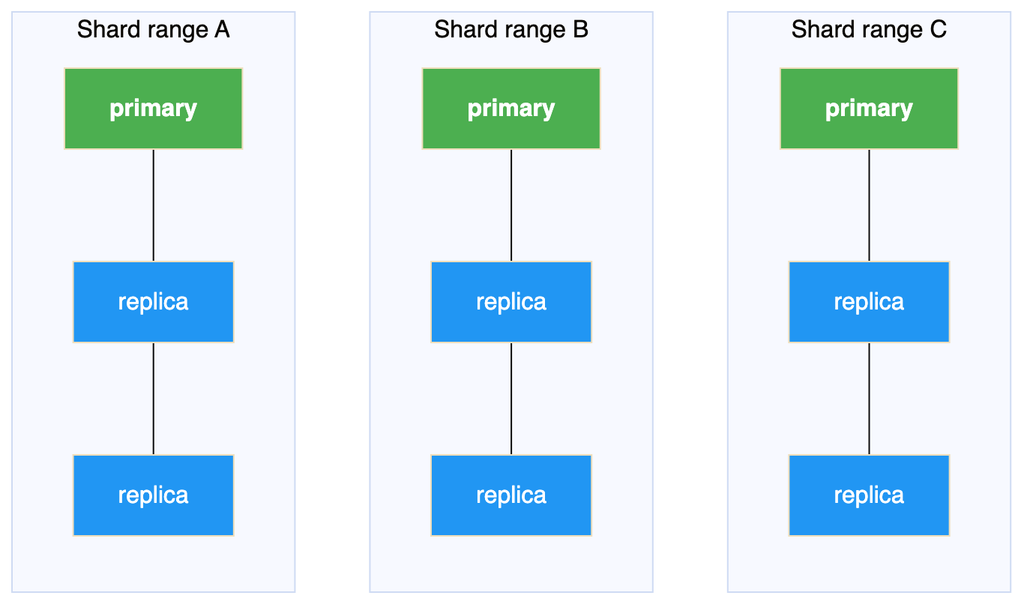
Sharding and replication solve different problems, and the clearest way to see it is as a grid. Sharding divides the data sideways. Replication stacks copies underneath each division.
Sharding divides the data left to right, into shard ranges. Replication stacks copies top to bottom, within each range.
A sharded cluster with no replication is the top row on its own. Every column is a single point of failure. A replicated cluster with no sharding is one column on its own: it survives losing a node but can only ever hold what one machine holds.
Neither is a subset of the other, which is the point. Having one gives you no progress towards the other.
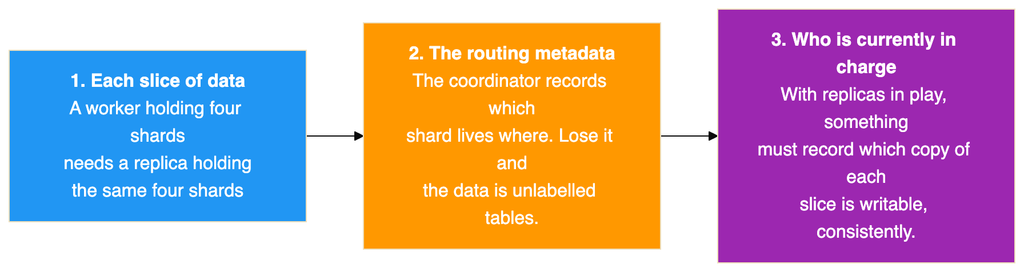
Three things, and it is worth separating them because they are protected differently.
The first two are solved the same way: run each of them as its own replicated cluster. A worker becomes a small Patroni cluster. The coordinator becomes another.
The coordinator is the one people skip, because it holds no table data and feels unimportant. It is the opposite. It is the only entry point and it holds the shard map, so losing it takes down the whole cluster even though every row is safe on the workers. Replicating it is the single most valuable change you can make, and it is cheap precisely because it stores no data.
The third item is the interesting one, and Section 3 is about it.
The coordinator records the address of each worker. Replicating a worker means that address can change, because a promotion makes a different machine the writable one.
So every combined design has to answer one question: when a worker’s primary changes, how does the coordinator find out?
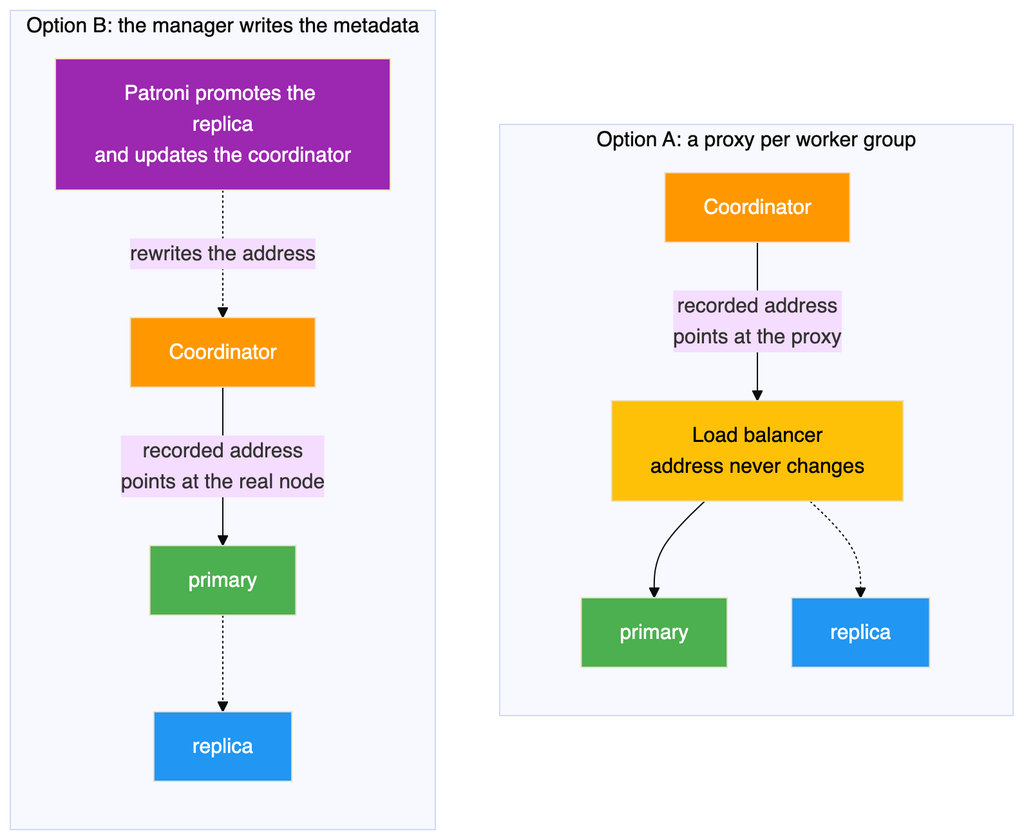
There are two established answers. Both work, and they differ in where the indirection sits.
Option A puts a load balancer in front of each worker group and records the proxy address. When the primary changes, the proxy follows it and the coordinator never notices. The appeal is that it reuses exactly the pattern the Patroni lab already proved.
Option B removes the proxy and has the thing that performs the failover also update the metadata. Patroni is what promotes the replica, so it already knows the new address and can write it in.
Consideration
Option A
Option B
Extra components per worker group
One load balancer
None
What the metadata records
A proxy address
The real primary address
Detection delay
Manager plus proxy health check
Manager only
Behaviour on planned switchover
Connections break
Traffic can be paused instead
Coupling between coordinator and workers
Loose
Shared cluster name and credentials
Option A suits you if worker groups are run by different teams or tooling, or if you already operate a proxy tier. Option B suits you if you want fewer moving parts.
The rest of this article works through Option B, because it has fewer components to describe. Where something applies only to that route, the text says so.
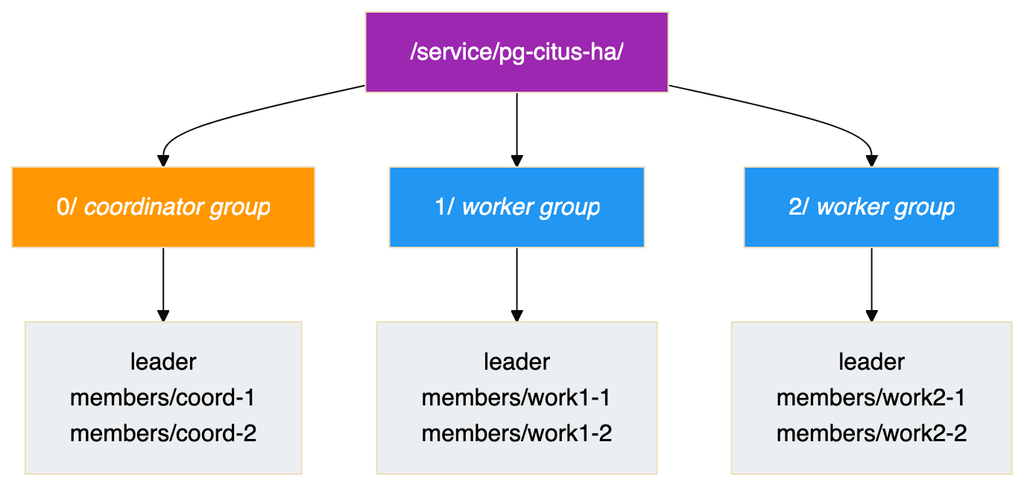
Patroni has supported Citus natively since version 3.0. The model is that a sharded formation is a set of independent Patroni clusters sharing one cluster name, distinguished by a group number. The coordinator is group 0. Workers are groups 1, 2, 3 and so on.
Configuration on each node is two lines:
citus: group: 0 # 0 for the coordinator, 1, 2, 3 and so on for workers database: citus # must be identical on every node
The same values can be given as the environment variables PATRONI_CITUS_GROUP and PATRONI_CITUS_DATABASE.
That is the whole configuration. Everything else follows from it, and the important behaviour is this: the coordinator’s primary discovers each worker group’s current primary and registers it in the shard map itself, then keeps doing so as groups fail over.
That is what removes the need for a proxy in front of the workers. The metadata is maintained by the thing that performs the failover.
Two version requirements come with it. Citus 10.0 is the minimum, and 11.2 or later is recommended, because the near transparent switchover in Section 9 depends on it.
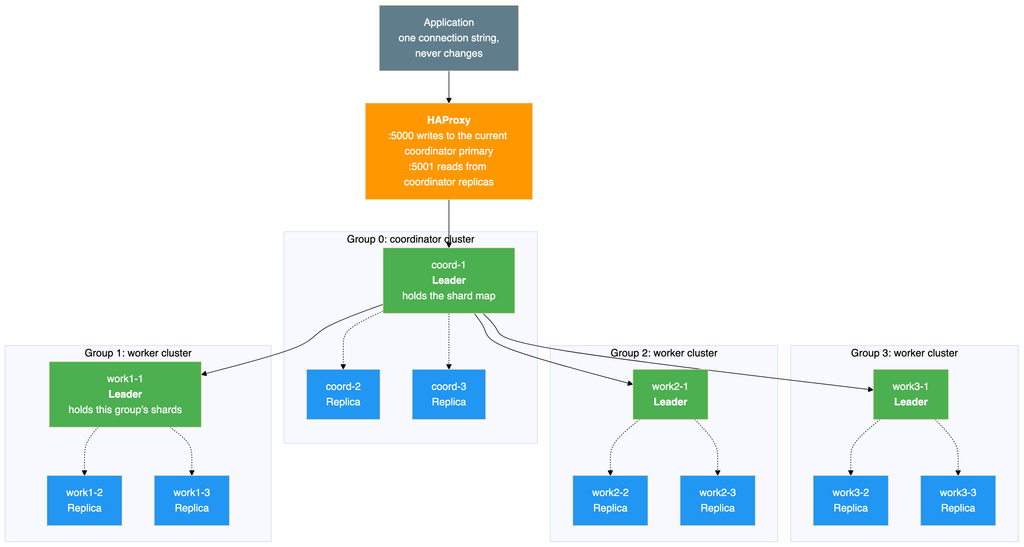
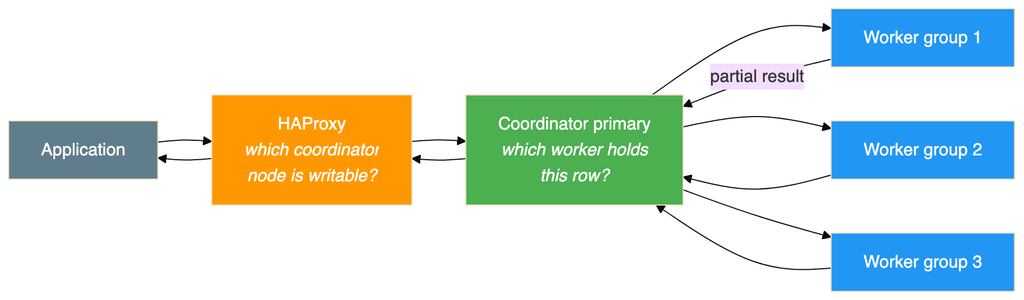
A three node coordinator group and three worker groups of three. This is the shape to aim for rather than the minimum.
Solid arrows are query traffic, dotted arrows are streaming replication inside a group. Every one of those twelve nodes runs its own Patroni process, and all of them talk to the same consensus store, which is left out here and shown in Section 6.
There is no load balancer in front of any worker group, because this is the Option B route. If you take Option A, add one per group between the coordinator and that group’s nodes and everything else stays the same. Either way the proxy in front of the coordinator stays, because that is the one place an external client needs an address that never changes.
The two layers answer different questions and neither knows about the other. HAProxy uses the Patroni health endpoint, exactly as measured in the Patroni lab. The coordinator uses the hash of the distribution column, exactly as measured in the sharding lab. Keeping them distinct is what makes the design tractable.
The grouping is visible in the key layout, and understanding it makes the failure behaviour obvious.
Three things follow.
Every group has its own leader lock. Group 1 electing a new leader has no effect on group 2, because those are different keys. Failures are contained to a group.
One recursive read fetches the whole formation. This is why the hierarchy exists. The coordinator needs every group’s current primary and can get it in a single request.
Reads are asymmetric. Only coordinator nodes read the whole tree, because only they need to discover workers. A worker reads its own subtree. Adding groups therefore does not multiply consensus traffic the way it might appear.
Once the group setting is present, Patroni does all of this without being asked, which removes most of the manual setup a plain Citus cluster needs.
What it does
Why it matters
Adds the Citus library to the preload list
Otherwise the extension does not function
Creates the database and the extension
Otherwise this is a script looping over every node
Sets prepared transactions to twice the connection limit
This defaults to zero and makes the rebalancer fail with an unclear error
Sets synchronous replication to quorum mode
Changes the durability guarantee, discussed below
Corrects the local hostname setting
The default assumes localhost, which is often wrong
Writes the superuser credentials into the cross node authentication table
This is what lets nodes authenticate to each other
Registers each worker group’s primary in the shard map
Replaces manual node registration entirely
Keeps the shard map correct across every failover
This is the whole point of the design
Two of those defaults deserve attention.
Quorum synchronous replication is a real change. The Patroni lab ran asynchronous replication, which is why its results note that a transaction committed in the final milliseconds before a crash can be lost. Quorum mode means a commit is not acknowledged until enough replicas confirm it. That is a stronger guarantee and it costs write latency. This article cannot quote a number, because it was never measured and it depends heavily on the network between nodes. It is the first thing to measure in a real deployment.
The prepared transactions default closes a real trap. The sharding lab hit this: the setting defaults to zero, Citus needs it for two phase commit during shard moves, and the error does not obviously point at the cause.
Four things are your responsibility, and getting any of them wrong produces confusing failures rather than clear ones.
The cluster name must be identical on every node. Coordinator and workers share one name, and the group number distinguishes them. Giving a worker its own name produces a separate cluster that the coordinator will never discover, and nothing reports an error.
The extension must be installed on every node, including replicas that will never serve a query until promoted. A replica missing it is a promotion that fails at the worst possible moment.
Superuser credentials must match across all nodes, and host based authentication must permit access between them. This is how cross node queries authenticate. Those credentials get written into the cross node authentication table, so rotating the password later means updating that table too. A rotation that misses it breaks cross node communication at some later, apparently unrelated moment.
The Patroni API must be reachable from workers to the coordinator. Worker nodes notify the coordinator during a switchover, and that is the mechanism that makes the switch nearly transparent. If a firewall blocks it the cluster still works, but you quietly lose the transparency and get the abrupt behaviour instead.
That last one passes every test in a lab, where everything sits on one network, and then fails in a production environment with real segmentation. Verify it explicitly.
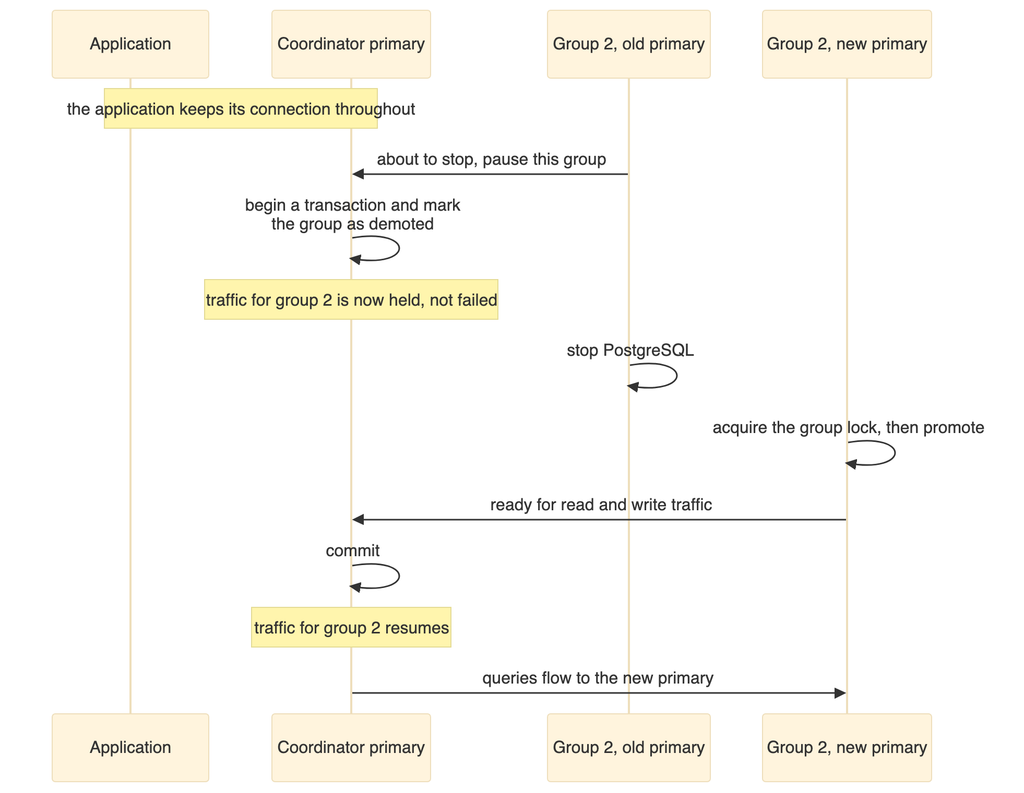
The coordinator can hold traffic destined for one worker group while that group changes primary, then release it.
The sequence is from the worked example in the Patroni documentation, where the pause lasted a little under three seconds. That is their figure from their environment, not a measurement of this design. Your own depends on how long the old primary takes to stop and the new one to promote.
The important word is paused, not failed. Queries that would have gone to that group wait rather than erroring. Contrast that with the Patroni lab, where a failover broke every open connection and the application had to retry.
This matters because most primary changes in a healthy system are planned ones: patching, resizing, moving a node between hosts. If your maintenance windows are frequent, it is worth weighing when choosing between the two routes.
That transparency depends on the old primary being able to announce its intent. A machine that loses power announces nothing.
Then the sequence is the familiar one from the Patroni lab. The group’s lock stops being renewed, expires, the surviving replicas compete, one is promoted, and the shard map is updated so the coordinator learns the new address. Queries in flight to the dead worker fail and must be retried.
The Patroni lab measured about 34 seconds for that cycle with a 30 second lock timeout, and established a more useful lesson: the delay is not fixed. The lock expires 30 seconds after its last renewal, not 30 seconds after the failure, so where in the renewal cycle the machine died changes the answer. In that run the lock had about 25 seconds left when the node stopped.
The tuning trade-off carries over and now applies per group. A shorter timeout speeds every group’s recovery and raises the chance that a transient network problem is mistaken for a dead worker. A false failover on a worker group is a real outage for the shards it holds.
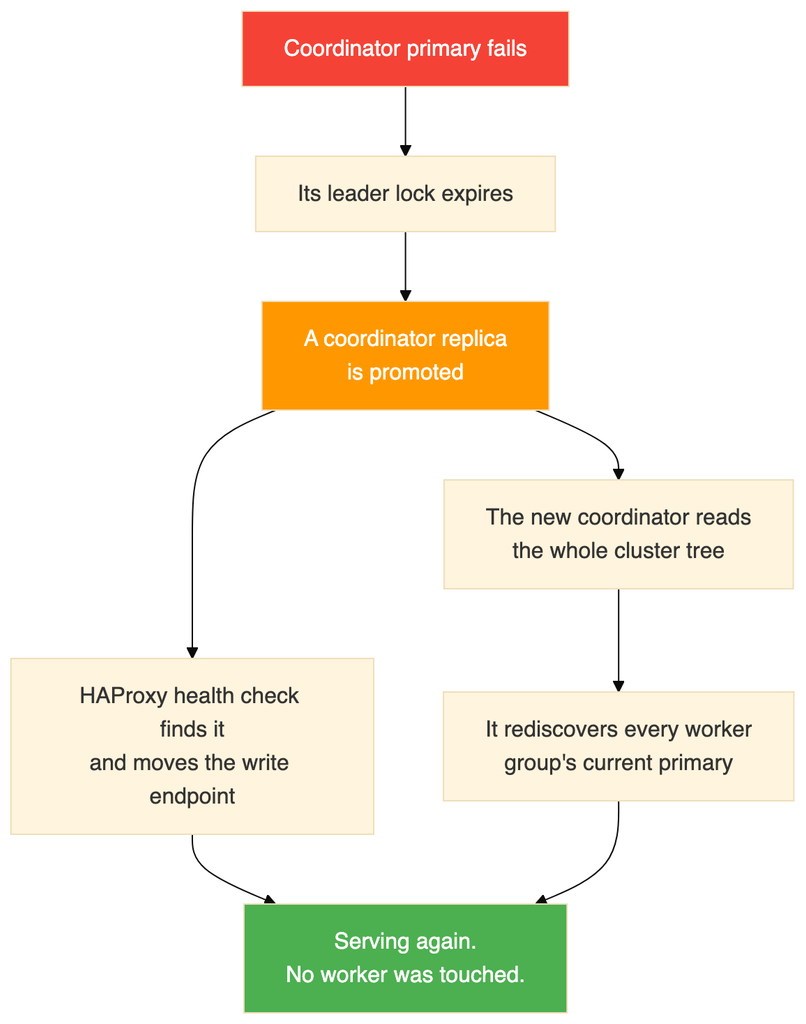
The coordinator group is an ordinary Patroni cluster, so it behaves exactly as measured in the Patroni lab.
Two things worth drawing out.
The workers are unaffected. They keep their data and their locks. The coordinator holds metadata, not table data, so what is being recovered is the map rather than the territory.
The new coordinator rebuilds its view from the consensus store. It reads the tree, finds each group’s primary and reconciles the shard map. This is the same discovery it does at startup, which is why the recovery needs no special handling.
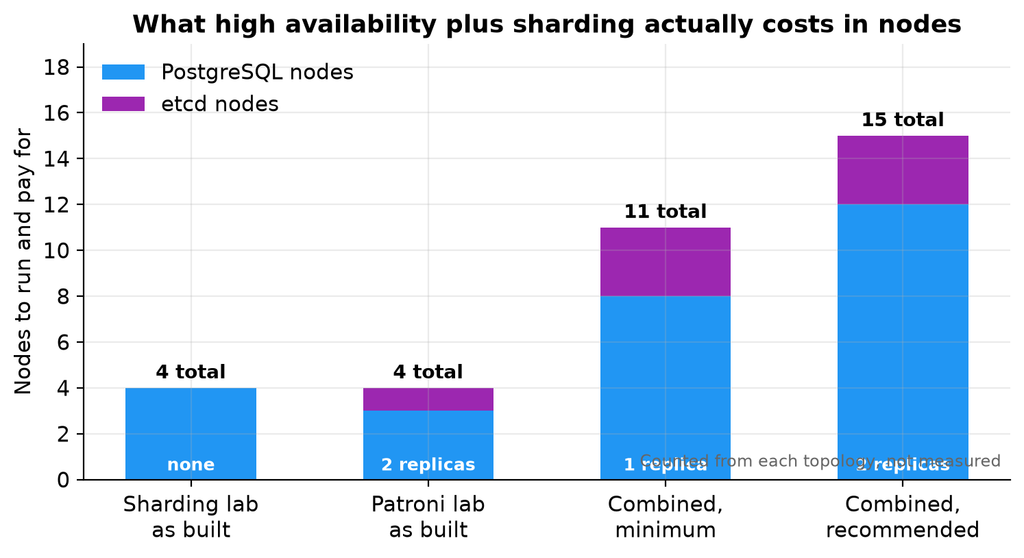
The multiplication is in the workers and cannot be avoided, because every group needs its own replicas. Adding a shard group later adds a whole group, not a node.
Two nodes per group tolerates one failure, and while that failure is unrepaired the group has no redundancy at all. The Patroni lab showed this exactly: after its failover and before the old primary rejoined, it ran for about seven minutes with a primary and a single replica, which is a working cluster with nothing left to fall back on. Three per group gives you room to lose one and still be safe.
The day to day experience changes in one important way: the coordinator and each worker group are separate clusters and cannot generally be managed as one thing.
The Patroni command line reflects this. Listing the cluster shows every group at once with a group column, so one command gives the whole picture. Most other commands need to be told which group they apply to, and switchover and member removal require it explicitly, because doing either to the wrong group would be an unpleasant surprise.
The pattern to internalise is one view, many control surfaces. You can see everything in one place, and you act on one group at a time.
A few consequences worth planning for.
Rebalancing and failover should not overlap. A rebalance moves data using logical replication and takes a lock at cutover, while a failover changes which node is primary underneath it. The sharding lab established that a worker failing during a rebalance causes the rebalance to abort with the shard left on the source and no data lost, which is the safe outcome. Even so, running a long rebalance when failovers are likely invites aborted work. Prefer the background form of the rebalance so the job is not tied to your session.
Adding capacity is now two steps. Provision a whole new group, let the coordinator discover it, then rebalance. The rebalance itself is unchanged: the sharding lab measured four of twelve shard groups moving with no rows lost and no downtime.
Major version upgrades are per group. Each cluster is upgraded independently, so an upgrade becomes a sequence of operations rather than one. Restarts should go through Patroni rather than the service manager, so it does not interpret the restart as a failure.
Failure is no longer all or nothing. Three groups healthy and one unavailable means queries touching the missing group’s shards fail while queries confined to other groups succeed. A point lookup for one customer may work while an aggregate across all customers does not. Monitoring and application code both need to handle partial availability.
The building block is a group, not a node. A sharded, highly available cluster is a set of independent replicated clusters: one for the coordinator and one per shard range. Thinking in groups makes the failure behaviour, the node count and the operational model all easier to reason about.
Keeping the routing metadata correct is the central problem. Everything else is two familiar mechanisms side by side. The one genuinely new question is how the coordinator learns that a worker group has a new primary, and the two answers are a proxy per group or a manager that writes the metadata itself. Pick one deliberately.
Replicate the coordinator. It holds no table data, which is exactly why it gets forgotten, and it is the one failure that takes down everything.
Planned and unplanned failures differ a lot. A deliberate switchover can pause traffic rather than break it, making routine maintenance nearly invisible. An abrupt loss still costs a lock timeout and broken connections. Designing maintenance to use the first path is a real operational win.
Sharding and high availability stay separate concerns even when combined. One layer answers which coordinator is writable, the other answers which worker holds a row, and neither knows about the other.
This is a design grounded in two tested labs and in documented behaviour, not a tested architecture. No cluster was built and no timing was captured. The one figure quoted for combined behaviour, the sub three second switchover pause, comes from published documentation rather than any run of ours.
The two most likely places for reality to differ are the write latency under quorum synchronous replication, which depends entirely on the network between nodes, and the behaviour when a coordinator failover and a worker failover overlap. Both deserve measuring before anyone depends on this.
Build the coordinator group first and confirm it elects a leader. Then add a single worker group and check that the coordinator discovers it with no manual registration. That is the step that proves the whole design works. If the shard map populates itself, everything else is repetition. If it does not, the usual causes are a mismatched cluster name, missing credentials, or a blocked path from worker to coordinator.
PostgreSQL already has table partitioning, where one large table is split into smaller pieces using a declarative partition clause. Partitioning is useful, but every partition still lives on the same PostgreSQL instance, on the same disk, using the same CPU. It does not spread data across machines.
For genuine sharding across nodes, where different rows physically live on different servers, there are three options:
Sharding in the application, so the application decides which database to connect to.
A proxy or middleware layer in front of several databases.
A PostgreSQL extension that handles distribution inside the database.
Citus is the third option. It runs inside PostgreSQL, so you keep standard SQL, standard tools and standard client access, while the data is physically spread across workers.
Capability
PostgreSQL on its own
PostgreSQL with Citus
Store data on more than one server
No
Yes
Route a query to the right shard
No
Yes, automatically
Run one query on many shards in parallel
No
Yes
Join co-located tables without a network hop
Not applicable
Yes
Add or remove nodes while running
Not applicable
Yes
Move data after adding a node
Not applicable
Yes, using logical replication
Standard SQL and tools
Yes
Yes
The honest summary is that partitioning helps you manage a big table on one machine, and sharding helps you use more than one machine. If your problem is that queries scan too much data, partitioning may be enough and is far simpler. If your problem is that one machine is genuinely full, you need sharding.
Two structural points shape everything else in this guide.
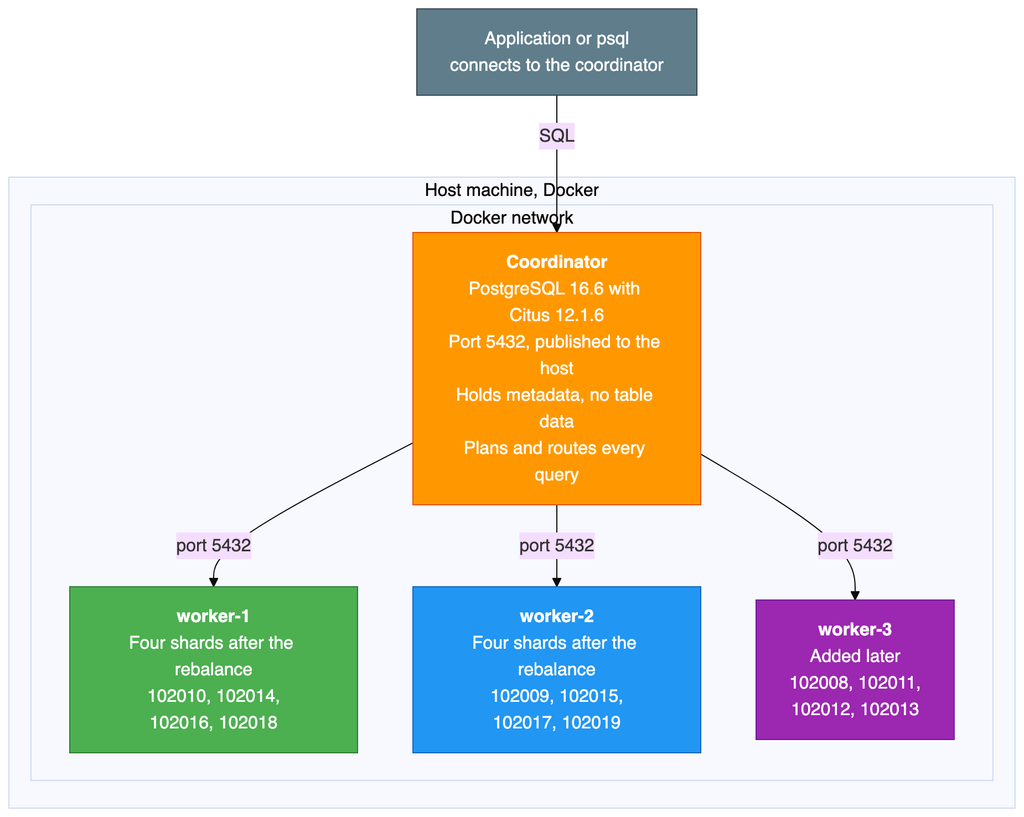
The coordinator stores no table data. It holds only the Citus metadata: which shard lives where, and which range of hash values each shard owns. All 10,500 rows sit on the workers. That makes the coordinator cheap to run, and also makes it a complete single point of failure, as the section on availability explains.
Workers are ordinary, independent PostgreSQL servers. They do not replicate to each other and they are not aware of each other. A shard is a normal PostgreSQL table with a number on the end of its name. You can connect to a worker directly and select from a shard table exactly as you would from any other table.
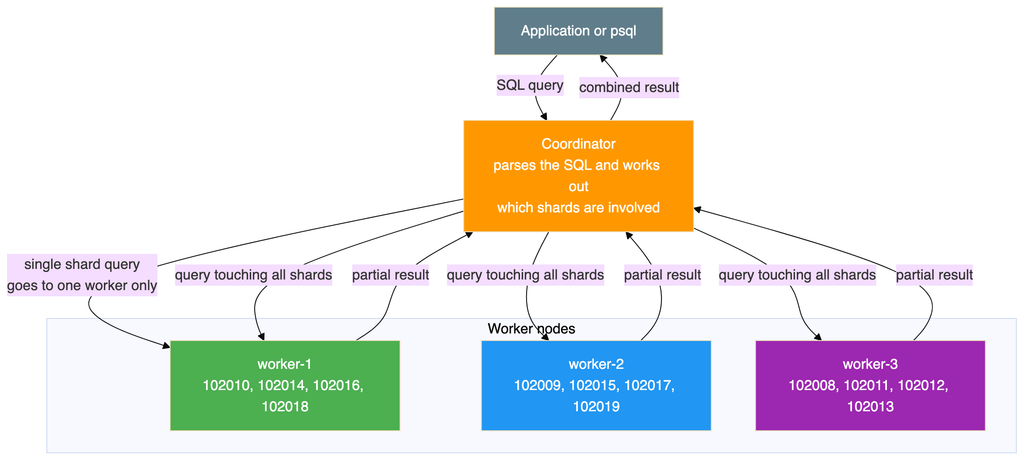
There are two shapes of query here, and the difference matters more than anything else for performance. A query that filters on the shard key goes to exactly one worker. A query that does not filter on the shard key has to be sent to every shard, with each one returning a partial answer for the coordinator to combine.
Citus uses hash based sharding. When a table is distributed on the customer identifier:
Citus hashes the value of that column.
The full range of possible hash values is divided into equal, non overlapping slices, one per shard.
Each shard is placed on a worker.
When a row is inserted, Citus hashes the value, finds which slice it falls into, and sends the row to the worker holding that shard.
When a query filters on that column, the same hash tells the coordinator which single worker to ask.
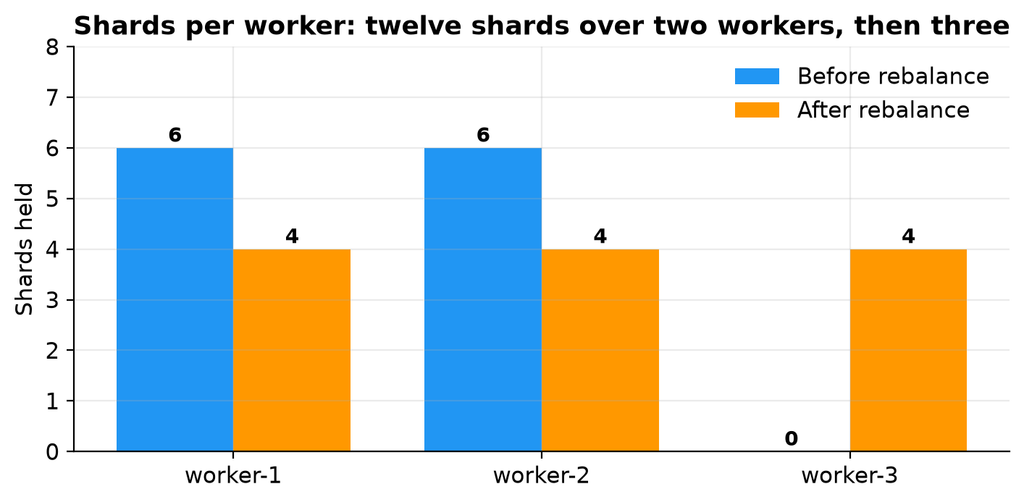
With twelve shards and three workers, each worker holds four shards. A shard holds a set of customer identifiers that happen to hash into the same slice. It is not a contiguous range of identifiers, which is why customers 100 and 500 can end up on the same shard while 1 and 42 do not.
All three tables are distributed on the same column and placed in the same co-location group. This has three consequences:
Shard number 102008 of the first table sits on the same worker as the matching shards of the other two tables.
A join between those tables on the shared column runs entirely inside one worker, with no data crossing the network.
The rebalancer moves whole co-location groups together, so related rows stay together.
Co-location is the single most consequential design decision in a sharded schema. Get it right and most of your queries touch one node. Get it wrong and almost every query becomes a distributed one, and changing it later means redistributing every table.
The client is optional, because you can run psql inside the coordinator container instead.
The lab runs three or four containers, so give Docker at least 4 GB of memory.
Note: This build was tested on Docker Desktop on Windows, where Linux containers run inside a small virtual machine and all Docker commands work normally from PowerShell. The same files work on macOS and Linux. The one difference is how you feed a SQL file into a container, because piping a file is written differently in PowerShell than in a Unix shell.
There is a small versioning trap here. Citus reports two different version numbers, and they answer different questions. The extension catalogue reports the SQL script version, which is 12.1-1 in this build. The Citus version function reports the compiled library version:
SELECT citus_version();
Which gives the full build string captured in the evidence:
                                     citus_version
----------------------------------------------------------------------------------------
 Citus 12.1.6 on x86_64-pc-linux-gnu, compiled by gcc (Debian 12.2.0-14) 12.2.0, 64-bit
(1 row)
Both numbers are correct. Only the second tells you the patch level, so use that one when you are checking whether a particular fix is present.
The repository holds the Compose file. This section explains what it sets up and why.
Four services sit on one Docker bridge network. The coordinator publishes port 5432 to the host, and the workers do not publish anything, so they are reachable only from inside the network. That mirrors how a real deployment works: clients talk to the coordinator and nothing else.
Each node has its own Docker volume. Every node runs a health check using the standard PostgreSQL readiness tool, every five seconds.
The third worker is defined behind a Compose profile, which means it does not start with the normal start command. It only starts when the profile is named explicitly. That is what makes the add a node exercise realistic, because nothing has to be rebuilt or reconfigured to bring it in.
Citus will not function unless it is loaded at server start
Logical write ahead log level
All nodes
The rebalancer moves shards using logical replication, which requires it
Twelve shards per distributed table
Coordinator
Twelve divides evenly by both two and three workers, which keeps the example tidy
One copy of each shard
Coordinator
No shard level replication in this lab. See the availability section.
Raised background worker limit
All nodes
Citus uses background workers for parallel queries and for rebalancing
Prepared transactions enabled
All nodes
Citus uses two phase commit across workers, which needs these
Trust authentication
All nodes
Passwordless connections inside the Docker network. Suitable for a lab only.
Two of these are worth calling out.
The logical log level and prepared transactions are not optional if you intend to rebalance. Both default to values that make the rebalancer fail, and the failures are not obvious from the error messages. They are the two most common reasons a first attempt at rebalancing does not work.
Trust authentication means no password is required at all. It is convenient in a lab and completely unacceptable anywhere else. Nothing in this build should be exposed to a network you do not fully control.
That loops over the coordinator and both workers, creating the customer_orders database and enabling the Citus extension in each. It has to be done per node, because Citus does not propagate a create database command to the workers.
# PowerShell, which is what the original run used Get-Content scripts/03-create-schema.sql | docker exec -i citus-coordinator psql -U postgres -d customer_orders Get-Content scripts/04-distribute-tables.sql | docker exec -i citus-coordinator psql -U postgres -d customer_orders Get-Content scripts/05-generate-data.sql | docker exec -i citus-coordinator psql -U postgres -d customer_orders
The order matters. The tables have to exist before they can be distributed, and they have to be distributed before the data is loaded, or the rows land on the coordinator instead of the workers.
The first prints the shard placement, the shard count per worker, and the row counts per shard and per worker. The second runs the query plans that show single shard routing and co-located joins.
The script starts the container with its profile, waits for it to accept connections, creates the database and extension on it, registers it with the coordinator, and then prints the shard distribution so you can see that the new worker holds nothing yet.
This prints the distribution before, runs the rebalance synchronously so the shard moves appear as they happen, then prints the distribution, the row counts per worker and the full placement afterwards.
The validation checks the totals, the duplicate counts, referential integrity in both directions, specific customers, the revenue aggregate and the identifier range.
# Open a session on the coordinator
docker exec -it citus-coordinator psql -U postgres -d customer_orders

# Where does every shard live?
docker exec citus-coordinator psql -U postgres -d customer_orders \
  -c "SELECT shardid, shard_name, nodename FROM citus_shards WHERE table_name::text = 'customers' ORDER BY shardid;"

# Which worker owns a given customer?
docker exec citus-coordinator psql -U postgres -d customer_orders \
  -c "SELECT get_shard_id_for_distribution_column('customers', 42);"

# Row count in every shard of a table
docker exec citus-coordinator psql -U postgres -d customer_orders \
  -c "SELECT shardid, result FROM run_command_on_shards('customers', 'SELECT count(*) FROM %s') ORDER BY shardid;"

# Progress of a rebalance that is still running
docker exec citus-coordinator psql -U postgres -d customer_orders \
  -c "SELECT * FROM get_rebalance_progress();"

# Prove a shard is just an ordinary table by reading it on the worker
docker exec citus-worker-1 psql -U postgres -d customer_orders \
  -c "SELECT count(*) FROM customers_102010;"
That last one is the command worth running if sharding still feels abstract. It connects straight to a worker, bypassing Citus entirely, and reads a shard as the plain PostgreSQL table it is.
Starting the stack with the normal Compose command brings up three containers: the coordinator and the first two workers. The third worker stays down, because it sits behind a profile.
Wait until all three report themselves as healthy. This is the container status from the test run:
NAME                IMAGE                  SERVICE       STATUS                  PORTS
citus-coordinator   citusdata/citus:12.1   coordinator   Up 47 hours (healthy)   5432/tcp
citus-worker-1      citusdata/citus:12.1   worker-1      Up 47 hours (healthy)   5432/tcp
citus-worker-2      citusdata/citus:12.1   worker-2      Up 47 hours (healthy)   5432/tcp
The command and creation columns have been left out to fit the page. Wait until all three report healthy.
One detail in that output is worth explaining rather than glossing over. The ports column shows a bare container port for all three, including the coordinator, even though the Compose file publishes the coordinator’s 5432 to the host. The reason is that this column reflects how the running container was actually created, and these containers had been up for 47 hours by the time the snapshot was taken. If you start the cluster from the current Compose file, the coordinator will instead show a published mapping in the form 0.0.0.0:5432->5432/tcp, and the two workers will still show a bare port.
Either way the important point holds: clients connect to the coordinator, and the workers are reachable only from inside the Docker network.
If port 5432 is already in use on your host, which usually means a locally installed PostgreSQL is running, the coordinator will fail to start. Change the published port in the Compose file and connect on the new one.
The Citus image creates the extension automatically in the default database. This lab uses a dedicated database instead, which has to be created on every node, with the extension enabled in each one.
The reason every node needs it is worth understanding. Citus keeps its metadata on the coordinator, but the shards themselves are ordinary PostgreSQL tables on the workers. When the coordinator distributes a table, it sends the schema definition to the workers so they can create the shard tables. If a worker does not have the database and the extension, that step fails.
Note that creating a database is not propagated to the workers automatically in this version, which is why it has to be done on each node. The setup script in the repository does this for all nodes in one pass.
Checking the extension afterwards:
SELECT extname, extversion FROM pg_extension WHERE extname = 'citus';
Result:
 extname | extversion
---------+------------
 citus   | 12.1-1
As noted in the versions section, this is the SQL script version rather than the library version.
The coordinator has to be told which workers exist. It also has to be told its own address, because the rebalancer needs to know about every node in the cluster including the coordinator itself.
-- Tell Citus its own address first
SELECT citus_set_coordinator_host('coordinator', 5432);

-- Then add each worker by hostname and port
SELECT citus_add_node('worker-1', 5432);
SELECT citus_add_node('worker-2', 5432);
The hostnames here are Docker service names, resolved by the container network. On real machines they would be DNS names or addresses the coordinator can reach.
Where to check the node details
This is the query to know, because it is how you confirm the cluster membership at any point:
SELECT nodeid, nodename, nodeport, noderole, isactive
FROM pg_dist_node
ORDER BY nodeid;
pg_dist_node is the Citus metadata table holding one row per node, coordinator included. There is also a helper that returns only the active workers, which is handy in scripts:
SELECT * FROM citus_get_active_worker_nodes() ORDER BY node_name;
After registering the coordinator and the two workers, the node list looked like this:
The role column says primary for every row, and that is a naming collision worth clearing up. This is Citus describing its own internal node classification. It has nothing to do with PostgreSQL streaming replication, and it does not mean these nodes have replicas. Each worker here is completely independent, and there is no replication between them.
Three tables were created. Orders reference customers, and order items reference both.
CREATE TABLE IF NOT EXISTS customers (
    customer_id BIGSERIAL,
    name        TEXT           NOT NULL,
    email       TEXT           NOT NULL,
    city        TEXT           NOT NULL,
    created_at  TIMESTAMPTZ    NOT NULL DEFAULT now(),
    PRIMARY KEY (customer_id)
);

CREATE TABLE IF NOT EXISTS orders (
    order_id     BIGSERIAL,
    customer_id  BIGINT         NOT NULL,
    order_date   DATE           NOT NULL DEFAULT CURRENT_DATE,
    total_amount DECIMAL(10,2)  NOT NULL,
    status       TEXT           NOT NULL DEFAULT 'pending',
    PRIMARY KEY (order_id, customer_id),
    CONSTRAINT fk_orders_customer
        FOREIGN KEY (customer_id) REFERENCES customers (customer_id)
);

CREATE TABLE IF NOT EXISTS order_items (
    item_id      BIGSERIAL,
    order_id     BIGINT         NOT NULL,
    customer_id  BIGINT         NOT NULL,
    product_name TEXT           NOT NULL,
    quantity     INT            NOT NULL,
    unit_price   DECIMAL(10,2)  NOT NULL,
    PRIMARY KEY (item_id, customer_id),
    CONSTRAINT fk_items_customer
        FOREIGN KEY (customer_id) REFERENCES customers (customer_id),
    CONSTRAINT fk_items_order
        FOREIGN KEY (order_id, customer_id) REFERENCES orders (order_id, customer_id)
);
Read the primary keys closely, because they are the part that differs from a normal schema.
There is one design detail that is specific to Citus and that catches everybody the first time.
Every unique constraint has to include the distribution column. The customers table is keyed on the customer identifier alone, which is fine because that is the distribution column. The orders table is keyed on the order identifier together with the customer identifier, rather than the order identifier by itself. The order items table does the same thing.
The reason is that uniqueness can only be enforced inside a single shard. There is no global index spanning all the workers, and building one would require coordination on every insert, which is exactly the cost sharding is meant to avoid. By including the distribution column in the key, Citus knows that all rows which could possibly collide are in the same shard, so a local unique index is sufficient.
The practical consequence is that you cannot simply take an existing schema and distribute it. Primary keys and unique constraints usually have to change first, and foreign keys have to line up with the distribution column too. This is normally the largest piece of work in adopting Citus, and it is worth knowing before you start rather than halfway through.
The shard key for all three tables is the customer identifier. This was a deliberate choice, and the alternatives were considered.
Criterion
Customer identifier
Order identifier
City
Number of distinct values
Good, 500
Good, 2,500
Poor, only 10
Spreads evenly
Yes, hashing distributes it
Yes
No, 50 customers per city
Allows co-located joins
Yes, all three tables have it
No, the customers table does not have it
No, the other tables do not have it
Commonly used as a filter
Yes, show me this customer’s data
Sometimes
Sometimes
Keeps one customer’s data together
Yes
No
No
The customer identifier wins for four reasons:
It exists in all three tables, so a customer, their orders and their order items all land on the same shard.
Joins on it stay local, with no data moving between workers.
A lookup for one customer touches one worker, not all of them.
It spreads reasonably evenly. Hashing 500 identifiers across twelve shards averages about 42 per shard. The observed spread was 32 to 47, which is normal variation at this size and evens out with more data.
What a bad shard key looks like. If the city column had been used, all 50 customers in one city would sit on a single shard. With only ten distinct cities and twelve shards, at least two shards would be permanently empty while the others carried everything. Worse, the imbalance would be invisible in a small test and would only become a problem at scale.
The general rule is that a good shard key has many distinct values, spreads them evenly, appears in most of your queries as a filter, and exists in all the tables you want to join. A tenant or customer identifier usually fits. A status column, a boolean, a country, or anything with a handful of values does not.
The tables were created as ordinary PostgreSQL tables first, then converted into distributed tables, with the second and third explicitly co-located with the first.
The colocate_with argument is the important one, and leaving it out is the most consequential mistake you can make here. Without it Citus is free to put each table in its own co-location group, and a join between them stops being local. It is worth being explicit even when Citus would have guessed correctly, because the intent is then recorded in the schema rather than left to a default.
The distribution was then confirmed with:
SELECT logicalrelid::text AS table_name,
       partmethod,
       colocationid,
       repmodel
FROM pg_dist_partition
ORDER BY logicalrelid::text;
What that conversion does:
Creates twelve shard tables on the workers, named after the original table with a shard number appended.
Gives each shard an equal, non overlapping slice of the hash space, recorded in the Citus metadata.
Assigns shards to workers in turn, in shard number order. With two workers that produced a strict alternation: the first shard to worker 1, the second to worker 2, the third to worker 1, and so on.
Places the co-located tables’ shards on the same workers as the matching shards of the first table.
Confirming the result:
 table_name  | partmethod | colocationid | repmodel
-------------+------------+--------------+----------
 customers   | h          |            1 | s
 order_items | h          |            1 | s
 orders      | h          |            1 | s
The partition method is hash. All three tables share co-location group 1, which is what makes local joins possible. The replication model column reports the streaming model, meaning a single copy of each shard.
Citus allocates shard numbers from one counter, in a contiguous block per table, in the order the tables were distributed.
Table
Shard numbers
Distributed
customers
102008 to 102019
First
orders
102020 to 102031
Second
order_items
102032 to 102043
Third
Co-located shards line up by position within the block, not by having the same number. The first customers shard is co-located with the first orders shard and the first order items shard. This is why a later section shows shard 102008 moving together with 102020 and 102032. They are one co-location group covering the same slice of the hash space, and Citus always moves them as a unit.
It also explains a number that would otherwise look arbitrary. The eleventh customers shard, 102018, pairs with the eleventh orders shard, 102030, which is the pairing the co-located join example relies on.
The data was generated entirely in SQL, using generate_series and cross joins rather than a loop:
-- 500 customers, cities cycling through a list of ten
INSERT INTO customers (name, email, city)
SELECT
    'Customer-' || i,
    'customer' || i || '@example.com',
    (ARRAY['New York', 'London', 'Tokyo', 'Paris', 'Sydney',
           'Berlin', 'Toronto', 'Mumbai', 'São Paulo', 'Singapore'])[1 + (i % 10)]
FROM generate_series(1, 500) AS s(i);

-- 5 orders for every customer, so 2,500 rows
INSERT INTO orders (customer_id, order_date, total_amount, status)
SELECT
    c.customer_id,
    CURRENT_DATE - (floor(random() * 365))::int,
    round((random() * 490 + 10)::numeric, 2),
    (ARRAY['pending', 'shipped', 'delivered', 'cancelled'])[1 + floor(random() * 4)::int]
FROM customers c
CROSS JOIN generate_series(1, 5) AS s(n);

-- 3 items for every order, so 7,500 rows
INSERT INTO order_items (order_id, customer_id, product_name, quantity, unit_price)
SELECT
    o.order_id,
    o.customer_id,
    (ARRAY['Widget', 'Gadget', 'Gizmo', 'Doohickey',
           'Thingamajig', 'Sprocket', 'Flange', 'Bracket'])[1 + floor(random() * 8)::int],
    1 + floor(random() * 10)::int,
    round((random() * 99 + 1)::numeric, 2)
FROM orders o
CROSS JOIN generate_series(1, 3) AS s(n);
Two things follow from how this is written. The city assignment uses the row number modulo ten, which is why every city ends up with exactly fifty customers rather than an approximate share. The amounts and dates use random(), which is why the revenue figures shown later cannot be reproduced on your machine even though the row counts can.
Table
Rows
How
customers
500
One per generated number
orders
2,500
Five per customer
order_items
7,500
Three per order
Total
10,500
Every insert went through the coordinator. The coordinator hashed each row’s customer identifier and sent the row to the correct worker, with no involvement from the client. This is the part that makes Citus pleasant to use: the application inserts rows as if into a normal table.
The script finishes by counting what it loaded:
SELECT 'customers'   AS table_name, count(*) AS row_count FROM customers
UNION ALL SELECT 'orders',      count(*) FROM orders
UNION ALL SELECT 'order_items', count(*) FROM order_items
ORDER BY table_name;
This is where sharding stops being abstract. The citus_shards view is the one to know: it lists every shard, which table it belongs to, which node holds it and how large it is.
SELECT shardid, shard_name, table_name::text, nodename, nodeport, shard_size
FROM citus_shards
WHERE table_name::text = 'customers'
ORDER BY shardid;
The shard placement for the customers table, before the third worker was added:
Twelve shards alternating between the two workers, six each. Every one is a real PostgreSQL table sitting in a worker’s database.
Row counts per worker. This one needs run_command_on_shards, which sends the same SQL to every shard of a table and returns the results as rows, with %s standing in for the shard’s real table name:
SELECT cs.nodename,
       count(*)              AS shard_count,
       sum(r.result::bigint) AS total_rows
FROM run_command_on_shards('customers', $cmd$ SELECT count(*) FROM %s $cmd$) r
JOIN citus_shards cs USING (shardid)
WHERE cs.table_name::text = 'customers'
GROUP BY cs.nodename
ORDER BY cs.nodename;
That totals 500. The small imbalance between 241 and 259 is expected, because hashing distributes values approximately rather than exactly.
The same ratio appears in all three tables, because they are co-located:
Table
worker-1
worker-2
Total
customers
241
259
500
orders
1,205
1,295
2,500
order_items
3,615
3,885
7,500
A customer with five orders and fifteen order items always lands on one worker, so the proportions follow the customer distribution exactly.
Row counts per individual shard, using the same function without the grouping:
SELECT shardid, success, result AS row_count
FROM run_command_on_shards('customers', $cmd$ SELECT count(*) FROM %s $cmd$)
ORDER BY shardid;
Result:
 shardid | success | row_count
---------+---------+-----------
  102008 | t       | 46
  102009 | t       | 41
  102010 | t       | 32
  102011 | t       | 44
  102012 | t       | 47
  102013 | t       | 47
  102014 | t       | 32
  102015 | t       | 47
  102016 | t       | 39
  102017 | t       | 35
  102018 | t       | 45
  102019 | t       | 45
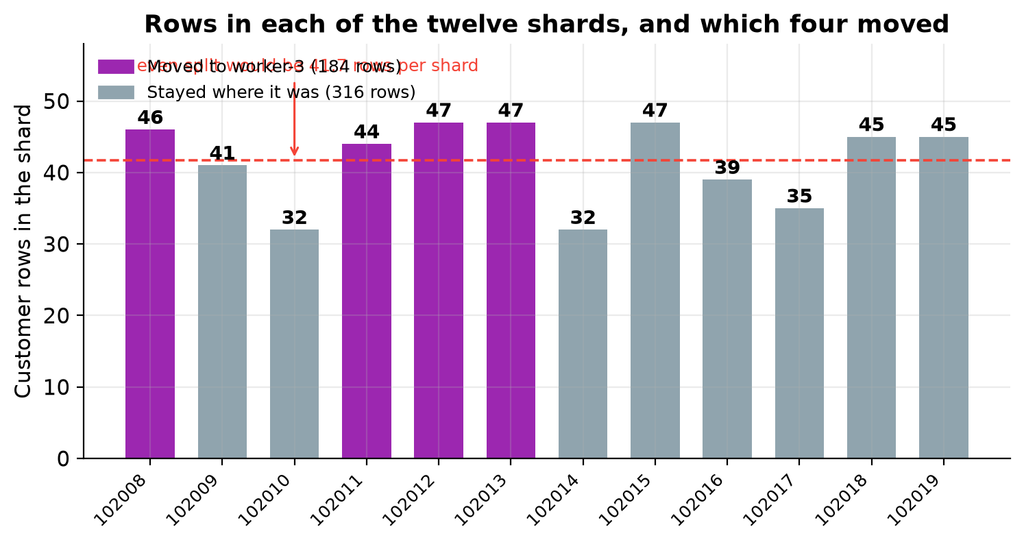
The range is 32 to 47 rows. The variation comes from the hash function, because some slices catch more identifiers than others. With more data the distribution evens out. These twelve numbers are used later to prove that the rebalance did not lose anything.
The chart makes two things visible at once. The bars show how uneven hash distribution really is at this scale: the busiest shard holds 47 rows and the quietest 32, against an even split of 41.7. Nothing is wrong, and no amount of tuning would flatten it, because the hash function is doing its job of scattering values rather than balancing counts.
The four coloured bars are the shards that the rebalancer later moved. Notice that it did not pick the four largest or the four smallest. It picked the set that produced an even shard count, which is a different objective, and the 184 rows that ended up on worker-3 are simply the consequence of that choice.
EXPLAIN (VERBOSE) SELECT * FROM customers WHERE customer_id = 42;
Asking for one customer by identifier produced a plan with a task count of one, naming a single shard and a single worker. Citus worked out that the identifier hashes to shard 102018, which was on worker 1, and sent the query only there. The other worker was not contacted at all.
This is the best case, and it is the case worth designing for. Adding more workers makes this kind of query no slower, because it always touches exactly one of them.
SELECT c.name, o.order_id, o.order_date, o.total_amount, o.status
FROM customers c
JOIN orders o ON c.customer_id = o.customer_id
WHERE c.customer_id = 42
ORDER BY o.order_date;
Joining customers to orders for one customer also produced a task count of one. Both tables’ shards for that customer are on the same worker, so the whole join ran there. No data moved between workers.
SELECT c.city,
       count(DISTINCT c.customer_id) AS customers,
       count(o.order_id)             AS orders,
       round(sum(o.total_amount), 2) AS total_revenue
FROM customers c
JOIN orders o ON c.customer_id = o.customer_id
GROUP BY c.city
ORDER BY total_revenue DESC;
Grouping revenue by city has no filter on the shard key, so it has to touch every shard. Each worker computed a partial result and the coordinator combined them:
   city    | customers | orders | total_revenue
-----------+-----------+--------+---------------
 Sydney    |        50 |    250 |      66162.73
 Toronto   |        50 |    250 |      65014.76
 Berlin    |        50 |    250 |      64942.73
 Paris     |        50 |    250 |      64364.26
 São Paulo |        50 |    250 |      63762.02
 Singapore |        50 |    250 |      63306.32
 Tokyo     |        50 |    250 |      62648.80
 New York  |        50 |    250 |      62305.02
 Mumbai    |        50 |    250 |      61182.11
 London    |        50 |    250 |      58398.65
Fifty customers in every city, totalling 500, which confirms nothing was missed. This query runs on all shards in parallel, so it is not slow, but it does get more expensive as workers are added rather than less. That is the trade-off of a query that cannot be routed to one shard.
Note the exactly even fifty per city. That is an artefact of how the sample data was generated, not a property of the hashing.
Asking Citus directly which shard a given identifier belongs to:
SELECT 1::bigint AS customer_id, get_shard_id_for_distribution_column('customers', 1) AS shard_id
UNION ALL SELECT 42,  get_shard_id_for_distribution_column('customers', 42)
UNION ALL SELECT 100, get_shard_id_for_distribution_column('customers', 100)
UNION ALL SELECT 250, get_shard_id_for_distribution_column('customers', 250)
UNION ALL SELECT 500, get_shard_id_for_distribution_column('customers', 500);
Identifiers 100 and 500 both map to shard 102014, while 1 and 42 are on different shards. This is what hash distribution means in practice. Shards hold sets of identifiers that hash together, not contiguous ranges, so you cannot look at a shard and describe its contents as a range.
The approach. Rather than starting with three workers, the cluster was deliberately built with two, filled with data, and only then extended. That is the situation people actually face, and it is the one where the interesting question arises, because the existing data has to move.
What was captured, and when. A full snapshot of the cluster state was written to files at two points: after the third worker was registered but before any rebalance, and again after the rebalance finished. Each snapshot recorded the container status, the Citus version, the node list, the shard placement, the shard count per worker, the row counts per worker for all three tables, the total row counts, and a sample of rows. The before and after tables later in this document are built from those two snapshots.
What was checked afterwards. Row totals for all three tables, duplicate checks on the keys, referential integrity in both directions, spot checks on specific customers, the revenue aggregate compared against its pre-rebalance value, and the range of customer identifiers.
What would have counted as a failure. Any change in a row total, any duplicate, any orphan row, or any difference in the revenue figures. None of those occurred.
The scripts that add the worker, run the rebalance, capture the snapshots and validate the data are in the repository.
The third worker was started using its Compose profile. Only that container started, and the coordinator and existing workers kept running without interruption.
Then the same preparation as any other worker: wait for it to be healthy, create the database, enable the extension, and register it with the coordinator.
The node list afterwards, from the same pg_dist_node query as before:
SELECT nodeid, nodename, nodeport, noderole, isactive
FROM pg_dist_node
ORDER BY nodeid;
The new worker holds nothing. It does not even appear in the list, because it owns no shards. Adding a node to Citus registers it and nothing more. The existing shards stay exactly where they were.
This is deliberate, and it is the right default. Moving data costs disk reads, network transfer and write ahead log volume on the source workers. Citus separates the decision that a node exists from the decision to pay that cost, so you can add capacity during a quiet period and move data during a quieter one. New distributed tables created from this point would use the new worker straight away, but existing data waits until you ask.
NOTICE: Moving shard 102011 from worker-2:5432 to worker-3:5432 … NOTICE: Moving shard 102008 from worker-1:5432 to worker-3:5432 … NOTICE: Moving shard 102013 from worker-2:5432 to worker-3:5432 … NOTICE: Moving shard 102012 from worker-1:5432 to worker-3:5432 …
Four shard groups moved: two from the first worker and two from the second. Each of those moves carried the co-located shards from all three tables, so moving shard 102008 also moved the matching orders and order items shards.
Those notices came from the interactive session rather than the evidence snapshots, but the captured placement afterwards confirms the same four moves independently:
SELECT shardid, shard_name, nodename FROM citus_shards WHERE table_name::text = 'customers' ORDER BY shardid;
Comparing this against the placement captured before the rebalance, the four shards now on worker-3 are exactly 102008, 102011, 102012 and 102013, and the remaining eight have not moved. The notices and the snapshot agree.
Notice what the rebalancer chose to do. It moved four shard groups, not twelve. It worked out the smallest set of moves that produces an even spread, and left the other eight groups untouched. That restraint matters on a real cluster, where moving a shard is expensive.
The distribution afterwards:
SELECT nodename, count(*) AS shard_count
FROM citus_shards
WHERE table_name::text = 'customers'
GROUP BY nodename
ORDER BY nodename;
Twelve shards across three workers, four each. The container list at this point, remembering that the profile has to be named or the third worker is left out:
docker compose –profile add-shard ps
It shows the newcomer alongside the original three, having been running for 43 minutes against their two days:
NAME                IMAGE                  SERVICE       STATUS
citus-coordinator   citusdata/citus:12.1   coordinator   Up 2 days (healthy)
citus-worker-1      citusdata/citus:12.1   worker-1      Up 2 days (healthy)
citus-worker-2      citusdata/citus:12.1   worker-2      Up 2 days (healthy)
citus-worker-3      citusdata/citus:12.1   worker-3      Up 43 minutes (healthy)
That uptime difference is the point of the exercise. The three original containers were never restarted, never reconfigured and never taken offline. Capacity was added and data was moved onto it while they carried on serving.
Row counts afterwards:
SELECT cs.nodename,
       count(*)              AS shard_count,
       sum(r.result::bigint) AS total_rows
FROM run_command_on_shards('customers', $cmd$ SELECT count(*) FROM %s $cmd$) r
JOIN citus_shards cs USING (shardid)
WHERE cs.table_name::text = 'customers'
GROUP BY cs.nodename
ORDER BY cs.nodename;
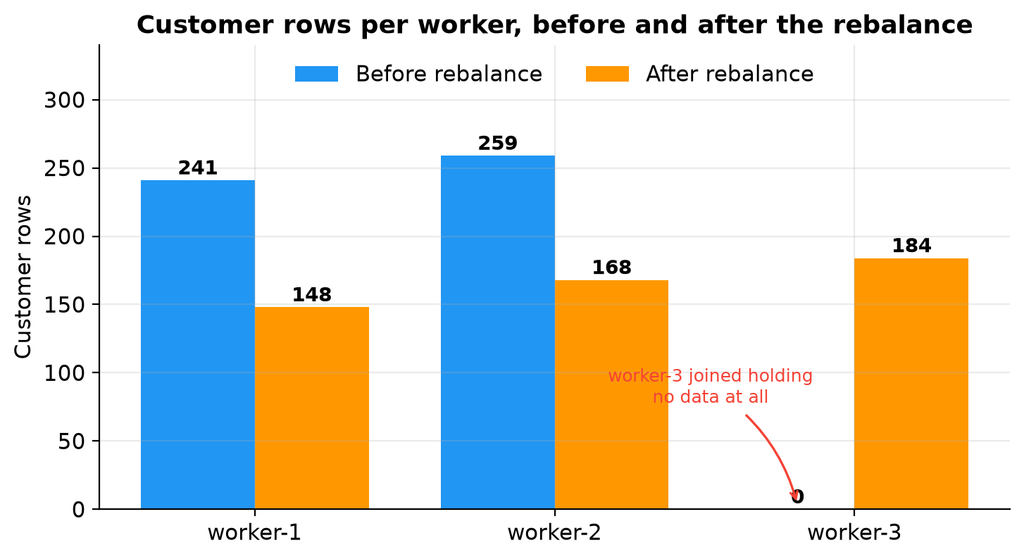
Note that the row counts are less even than the shard counts. Four shards each, but 148, 168 and 184 rows.
That is expected, because the rebalancer does not look at row counts at all. Citus assigns every shard a cost and then equalises the total cost per worker. In version 12.1 the default strategy is by_disk_size, which uses the shard’s size on disk as its cost. An older strategy called by_shard_count gives every shard a cost of 1, which makes balancing the cost the same as balancing the number of shards. You can switch between them, or define your own.
In this lab the two strategies would produce the same plan, because the data is small and every shard reported the same size on disk. That is why the result came out as a clean four, four and four. On a real cluster with shards of genuinely different sizes the two strategies diverge, and you can end up with an uneven shard count precisely because the sizes were being equalised instead.
Either way, an even shard count does not imply an even row count, and neither is what the rebalancer is aiming for.
Four of twelve shards moved, two from each existing worker.
Shard count per worker:
Worker
Before
After
Change
worker-1
6
4
Two fewer
worker-2
6
4
Two fewer
worker-3
0
4
Four more
Row count per worker for the customers table:
Worker
Before
After
Change
worker-1
241
148
93 fewer
worker-2
259
168
91 fewer
worker-3
0
184
184 more
Total
500
500
No change
This is the chart that shows what a rebalance actually is. The two original workers each gave up roughly a third of their rows, the new worker went from nothing to 184, and the total stayed at 500. No row was created and none was lost. The load simply moved.
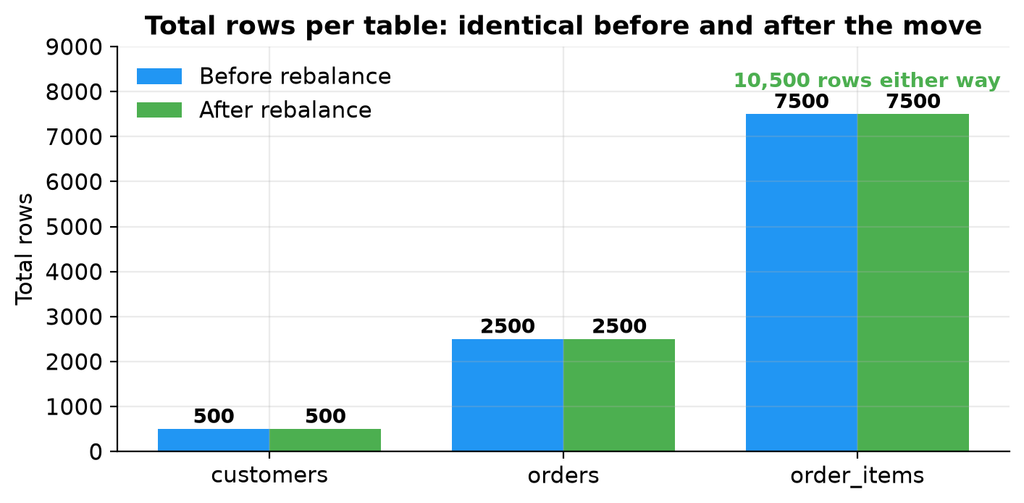
Total row counts:
Table
Before
After
customers
500
500
orders
2,500
2,500
order_items
7,500
7,500
Total
10,500
10,500
A chart of two identical sets of bars is a dull picture, and that is the entire point. Physically relocating a third of the data across the network changed nothing that the application can observe.
The per shard counts from the earlier section reconcile exactly against the per worker totals, which is the strongest evidence available that nothing was lost or duplicated.
Worker
Shards held
Row counts
Total
worker-1, before
102008, 102010, 102012, 102014, 102016, 102018
46, 32, 47, 32, 39, 45
241
worker-2, before
102009, 102011, 102013, 102015, 102017, 102019
41, 44, 47, 47, 35, 45
259
worker-1, after
102010, 102014, 102016, 102018
32, 32, 39, 45
148
worker-2, after
102009, 102015, 102017, 102019
41, 47, 35, 45
168
worker-3, after
102008, 102011, 102012, 102013
46, 44, 47, 47
184
Both groupings total 500, and every shard arrived holding exactly the rows it started with.
That last point is the important one. A shard move relocates data. It does not re-hash it. The distribution column decides which shard a row belongs to, and that never changed. Only the shard’s location changed. This is why a rebalance is safe to run on a live cluster: Citus is not recalculating anything, so there is no moment when a row could belong to two shards or to none.
The validation script was run after the rebalance. These are the checks that matter, and they are worth running on any cluster after a shard move rather than trusting the shard counts alone.
-- Totals must match what was loaded
SELECT 'customers' AS table_name, count(*) AS total FROM customers
UNION ALL SELECT 'orders',      count(*) FROM orders
UNION ALL SELECT 'order_items', count(*) FROM order_items
ORDER BY table_name;

-- A shard copied twice would show up here
SELECT count(*) AS duplicate_customers
FROM (SELECT customer_id FROM customers
      GROUP BY customer_id HAVING count(*) > 1) dupes;

-- A half moved co-location group would break this
SELECT count(*) AS orphan_orders
FROM orders o
LEFT JOIN customers c ON o.customer_id = c.customer_id
WHERE c.customer_id IS NULL;

SELECT count(*) AS orphan_items
FROM order_items oi
LEFT JOIN orders o ON oi.order_id = o.order_id AND oi.customer_id = o.customer_id
WHERE o.order_id IS NULL;

-- Range should still be the full 1 to 500
SELECT min(customer_id) AS min_id, max(customer_id) AS max_id FROM customers;
The two orphan checks are the ones that would actually catch a botched rebalance. If Citus had moved a customers shard without its matching orders shard, those joins would start finding rows with no partner and the counts would stop being zero.
Check
Expected
Actual
Result
Total customers
500
500
Passed
Total orders
2,500
2,500
Passed
Total order items
7,500
7,500
Passed
Duplicate customer identifiers
0
0
Passed
Duplicate orders
0
0
Passed
Orders with no matching customer
0
0
Passed
Order items with no matching order
0
0
Passed
Order count for a specific customer
5
5
Passed
Another customer, five orders and fifteen items
Yes
Yes
Passed
Revenue by city matches the pre-rebalance figures
Yes
Yes
Passed
Range of customer identifiers
1 to 500
1 to 500
Passed
Co-located joins, three table joins and aggregate queries all returned the same results as before the rebalance.
The referential integrity checks are the ones worth noting. Because the tables are co-located, a customer and their orders moved together. If the rebalancer had moved them independently, a join would have started returning rows with no match, and the orphan checks would have caught it. They returned zero.
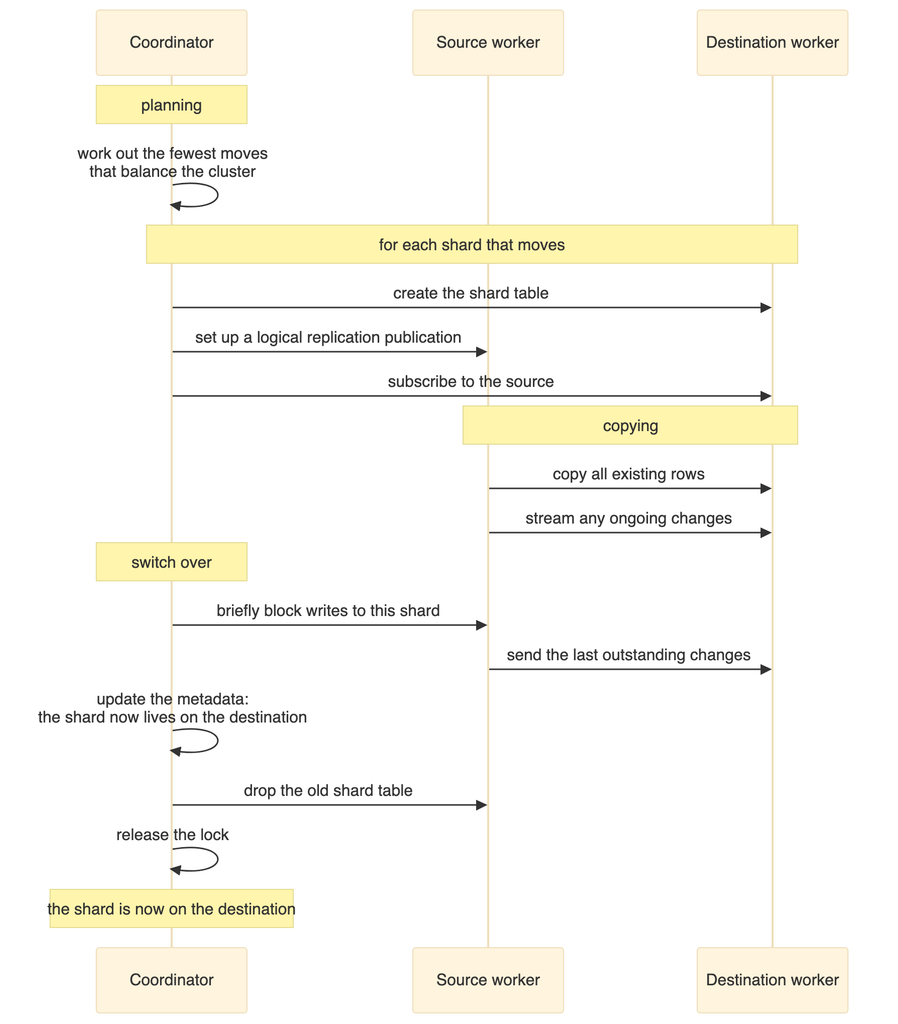
The shard stays readable while it is being copied. Queries continue to work and are served by the source worker until the switch over happens.
The copy uses logical replication. This is why the logical log level is required on every node. Citus creates a temporary publication and subscription, copies the data, then removes them.
The switch over is brief but it is not free. Citus locks the shard, waits for replication to catch up, updates the metadata, drops the old copy and releases the lock. For small shards this takes milliseconds. For large shards under write load it takes longer, and writes to that one shard wait during it. Other shards are unaffected.
Co-located shards move as a group, which is what keeps related rows together and keeps joins local.
The coordinator metadata is the authority. Once the move is recorded, any query hashing to that shard is routed to the new worker.
The shards on that worker are unavailable. With a single copy of each shard there is no replica, so queries needing those shards fail.
The coordinator fails
Everything fails. It is the only entry point.
A worker fails during a rebalance
The rebalance stops. The shard stays on the source worker, and no data is lost.
The coordinator fails during a rebalance
Incomplete moves are cleaned up, because Citus records the state of each move in its metadata. Leftover tables from an interrupted move can be removed with the Citus cleanup function.
This is the part of the guide worth pausing on, because it runs against the intuition that more machines means more resilience.
As built, this cluster is less available than a single PostgreSQL server. With one copy of each shard and four containers, there is no redundant copy of anything, and any one of those four failing takes down some or all of the database. The number of things that can break has been multiplied by four and no redundancy has been added.
Sharding is a technique for scale, not for availability. Treating the two as the same thing is a genuinely dangerous mistake, and it is an easy one to make because both are described as distributing the database.
Citus does have a setting for more than one copy of each shard, but it is not the answer here. That mechanism is statement based replication intended for append only workloads, it is deprecated in current Citus, and it does not apply to the hash distributed tables used in this lab.
More shards give finer control when rebalancing, but add overhead to every query that touches all of them. The Citus default is 32. This lab uses 12 to keep the output readable.
Distinct values in the shard key
Too few values creates hotspots. Five hundred customer identifiers work well. A boolean would be a terrible choice.
Co-located joins
Joins on the shard key run inside one worker with no network cost. Joins on other columns require moving data between workers, which is far more expensive.
Network latency
Everything here is on one host. In a real deployment the latency between nodes affects every query that touches more than one shard.
Rebalancing under load
The rebalancer adds write ahead log volume and disk activity on the source worker. Schedule it for a quiet period.
The single largest performance factor is not in this table. It is whether your queries filter on the shard key. A query that does touches one worker. A query that does not touches all of them, and no amount of tuning changes that.
Adding a worker. Always the same sequence: start it, create the database and the extension, register it with the coordinator, then rebalance when you are ready to move data.
Removing a worker. Drain it first, which moves its shards elsewhere, and only then remove it. Removing a worker that still holds shards loses data.
Monitoring the distribution. The Citus shards view shows where every shard lives and how large it is. Grouping it by table and node gives you the balance at a glance. It is worth checking after every rebalance and occasionally in between, because shards grow at different rates.
Watching a rebalance in progress. Citus provides a progress function that reports how far each shard move has got. This is more useful than it sounds on a large cluster, where a rebalance can run for a long time.
Counting rows per shard. Citus can run the same command on every shard of a table and return the results together, which is how the per shard counts in this document were produced. It is the quickest way to spot a skewed distribution.
The exact queries and functions are in the repository scripts.
Patroni and streaming replication for the coordinator
All containers on one host
No real network separation, and one machine to lose
Separate physical or virtual machines
Trust authentication
No security at all
TLS with password or certificate authentication
No backups
Data loss is permanent
Base backups and log archiving on every node, with restores tested
No monitoring
Problems are invisible until they are serious
Metrics collection and query statistics
One copy of each shard
No redundancy
Each worker behind its own highly available cluster
Twelve shards
Too few to spread across a larger cluster later
Between 32 and 128, depending on how large you expect to grow
No connection pooling
Connection overhead on the coordinator
A connection pooler in front of the coordinator
The shard count deserves a note. Choosing it is more consequential than it looks, because changing it later means redistributing every table. Pick a number with plenty of factors, comfortably larger than the number of workers you expect, so that future rebalances can spread evenly.
The first attempt called a function that does not exist, and PostgreSQL reported that no such function was available.
The name used was a plausible looking blend of two real ones. Citus exposes two different ways to start a rebalance:
Function
Behaviour
The synchronous rebalance function
Blocks the session until every shard has moved, printing each move as it happens. This is what produced the output shown earlier. It is formally deprecated as of Citus 11.2, but still works in 12.1.6.
The background rebalance function
The supported replacement. Schedules the work as a background job and returns immediately. Separate functions report its status, wait for it, and stop it.
The synchronous form was used here on purpose, because printing each move is what makes the mechanism visible. For production use the background form. The deprecation is not arbitrary: a real rebalance can run for hours, and a synchronous call ties its fate to whoever happened to be logged in.
The rebalancer refused to start, reporting that prepared transactions need to be enabled.
The cause is that the relevant PostgreSQL setting defaults to zero, while Citus uses two phase commit across workers during a shard move. The fix is to raise it in the server settings on every node, which the Compose file in the repository now does.
Shard moves failed because the write ahead log level was not set to logical.
The rebalancer copies data using logical replication, so that level is required on every node, not just the coordinator. This is set in the Compose file for all services.
The cause was either that the container was not ready yet, or that the database did not exist on it. The fix is to wait for the readiness check to pass, then create the database and the extension, and only then register the node.
A query calling a function to find which shard owns a value failed, because the name was slightly wrong. The correct name refers to the distribution column rather than the distribution value. This is easy to get wrong from memory, and the error message names the function that was not found, which makes it quick to spot.
Stopping the cluster with the normal Compose command, including the profile so the third worker is included, removes the containers but keeps the named volumes, so starting again brings the data back.
Adding the volume removal flag deletes all four volumes and every row with them. The next start builds an empty cluster.
Remember to include the profile in the shutdown command. Without it the third worker is not part of the operation and its container and volume are left behind, which is confusing the next time you start up.
Phase 1, the initial cluster. Three containers: coordinator, worker 1 and worker 2. Twelve shards per table, six on each worker. Data loaded: 500 customers, 2,500 orders and 7,500 order items. Customer rows split 241 and 259. All queries working.
Phase 2, the third worker added. Four containers. Shards still six and six, with zero on the new worker. The new worker was registered and active but held no data, which is the expected behaviour.
Phase 3, after the rebalance. Four shard groups moved to the new worker: 102008, 102011, 102012 and 102013. Shards evenly split four, four and four. Customer rows split 148, 168 and 184. Total rows unchanged at 10,500. No duplicates, no orphan rows. Joins and aggregates returned identical results.
Adding a node does nothing until you rebalance. The third worker joined and sat empty. Citus keeps the decision that a node exists separate from the decision to move data onto it, so you control when the cost is paid.
Co-location is the decision you cannot cheaply undo. Distributing all three tables on the same column is why joins stayed on one worker and why the rebalancer could move related rows as a unit. Getting it wrong makes almost every query distributed, and fixing it later means redistributing everything.
The shard key has permanent consequences. It decides which queries are fast, which have to touch every node, and where hotspots form. The city column would have looked acceptable in a small test and failed at scale.
A rebalance moves shards, it does not re-hash rows. Every shard arrived holding exactly the rows it left with. That property is what makes an online rebalance trustworthy.
Sharding is not high availability. With one copy of each shard, this cluster has four single points of failure. Scale and resilience are different problems and need different solutions.
Sharding has permanent costs. Queries that do not filter on the shard key get slower. Unique constraints have to include the distribution column, which usually means changing your schema. Foreign keys are constrained. Every operational task multiplies by the number of nodes.
Before reaching for it, exhaust the cheaper options: better indexing, query tuning, connection pooling, read replicas, table partitioning, and simply using a larger machine. Modern hardware runs single node PostgreSQL databases into the multi terabyte range without complaint.
Shard when you have a demonstrated limit on write throughput or data volume that one machine genuinely cannot meet, and when your access patterns have a natural distribution key, usually a tenant or customer. If you cannot name that key with confidence, you are not ready to shard.
Deliberately choose a bad shard key on a copy of this schema, load the same data, and watch the skew appear in the per shard counts.
Add a reference table, which is a small lookup table copied to every worker, and see how it turns previously distributed joins into local ones.
Drain a worker and remove it, then confirm the row counts still reconcile.
Combine this lab with the Patroni guide in the same repository: put each worker behind its own highly available cluster, then stop a worker’s primary while a query is running.
The sharding build is in the postgres-sharding-lab folder. This document explains what each step does and what happened when it was tested. It does not reproduce the files themselves, so please read them in the repository if you plan to adapt them.