Prerequisites
| Software | Purpose | Version |
| Docker Desktop or Docker Engine | Container runtime | Version 4 or later |
| Docker Compose | Service orchestration | Version 2, which ships with Docker Desktop |
| Git | To clone the repository | Any recent version |
| psql | PostgreSQL client, optional | Any version |
The client is optional because you can run psql inside any of the containers instead of installing it on the host.
The environment runs five containers: one etcd, three PostgreSQL nodes and one HAProxy. Give Docker at least 4 GB of memory. The default allocation is usually enough.
This build was tested on Docker Desktop on Windows, where Linux containers run inside a small virtual machine and all Docker commands work normally from PowerShell. The same files work on macOS and Linux.
Component Versions
These versions were tested together on 29 August 2026 and worked.
| Component | Version | Image |
| PostgreSQL | 16.4 | postgres:16.4-bookworm |
| Patroni | 3.3.2 | Installed with pip into a custom image |
| etcd | 3.5.15 | quay.io/coreos/etcd:v3.5.15 |
| HAProxy | 2.9 | haproxy:2.9-alpine |
| Python | 3.11 | Included in the Debian base image |
PostgreSQL 16.4 was the current stable release in the 16 series. Patroni 3.3.2 supports PostgreSQL 16 and includes the etcd version 3 client. etcd 3.5.15 is a stable release providing the version 3 API that this Patroni client needs. HAProxy 2.9 is a stable release.
One version detail caused a real problem during the build. etcd 3.5 has the older version 2 API switched off by default, so Patroni has to be installed and configured for the version 3 API. The section on problems hit while building this explains what went wrong and how it was fixed.
Configuration Summary
The repository holds the actual files. This section explains what they set up and why, so you can read them with some context.
How the containers are wired together
All five services sit on one Docker bridge network and find each other by service name, so there are no hard coded IP addresses anywhere.
etcd starts first. The three database nodes wait for the etcd health check to pass before they start. HAProxy starts after the three database containers have been created, although it does not wait for them to be healthy, because it runs its own health checks anyway.
Each database node has its own Docker volume for its data directory. Volumes are never shared between nodes. Three nodes means three independent copies of the data.
Only three ports are published to the host: 5000 for writes, 5001 for reads and 7000 for the statistics page.
Every service is set to restart unless it has been stopped deliberately. This matters during the test, because it is the reason a stopped container stays stopped until it is started again by hand.
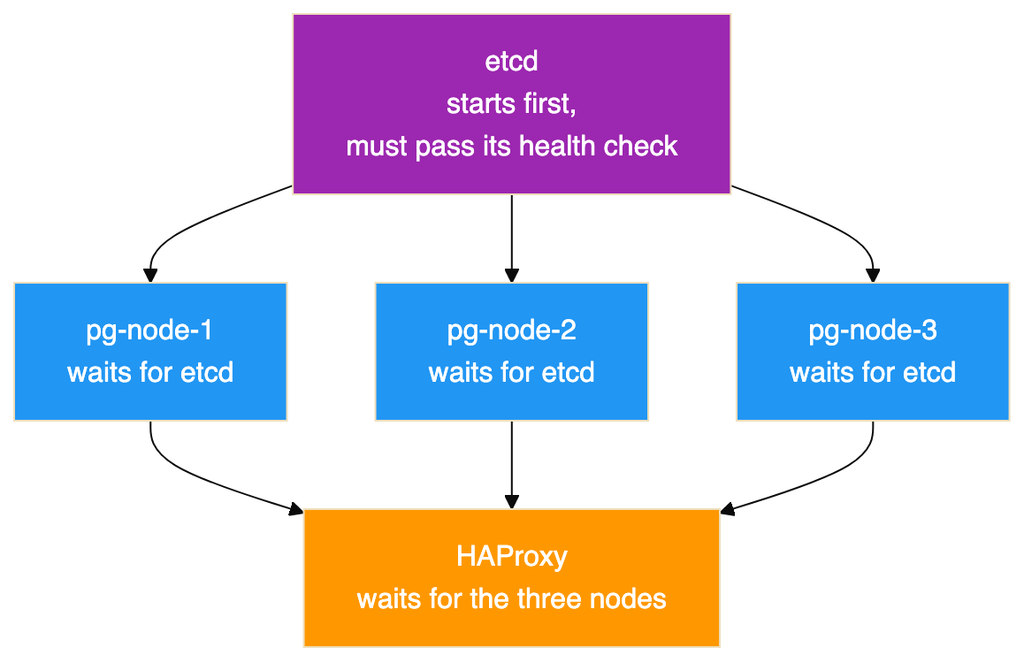
The three database nodes start at the same time once etcd is ready. Whichever one takes the leader lock first creates the database, and the other two copy it.
Credentials
The repository includes an example environment file. Copy it to a real one before starting the cluster, and change the values. The example file is deliberately committed with obvious lab only values, and the real file is excluded from version control.
The variables define three separate accounts, which is a habit worth keeping even in a lab.
| Variable | Used by | Purpose |
| Superuser name and password | Patroni | The PostgreSQL superuser Patroni uses to manage the cluster |
| Replication user and password | Patroni and PostgreSQL | Authenticates streaming replication between nodes |
| Application user and password | Your application | The account the application connects with |
| Application database name | Your application | The database the application uses |
No values are printed in this document on purpose. Do not reuse the ones in the repository. Generate your own, and in production keep them in a secrets manager rather than a file on disk.
One practical note if you fork this repository. Patroni prints its rendered configuration at startup, so the captured container logs under test-results contain those lab passwords in plain text. That is fine for a disposable lab whose credentials are already public, but it is worth remembering before you point the same setup at anything you care about.
The PostgreSQL settings Patroni applies
One template is shared by all three nodes, and the entrypoint script fills in the values that differ. The settings below are the ones that matter for high availability.
| Setting | Value | Why it is set |
| wal_level | replica | Required for streaming replication |
| hot_standby | on | Lets replicas answer read queries |
| wal_log_hints | on | Required for pg_rewind to work |
| max_wal_senders | 5 | How many replication connections the primary will accept |
| max_replication_slots | 5 | How many replication slots can exist |
| max_connections | 100 | The PostgreSQL default. A replica will refuse to start if this is lower than on the primary. |
| max_worker_processes | 8 | Background worker limit, with the same constraint as max_connections |
| hot_standby_feedback | on | Replicas tell the primary which rows their running queries still need, so cleanup on the primary does not cancel queries on the replica |
Three of these deserve more explanation, because they are the ones people get wrong.
The wal_log_hints setting is not optional in this design. The pg_rewind tool has to identify every page that the diverged server changed. Without hint logging, or without data checksums, that information is not in the log and pg_rewind refuses to run. A failed primary would then only be able to rejoin by copying the whole database. On a large database that is the difference between a few seconds and several hours.
Replication slots protect replicas, and can fill your disk. Without a slot, a primary will happily delete log segments that a disconnected replica still needs, and that replica can never catch up. With a slot, the primary keeps those segments. The risk is the mirror image: a slot belonging to a replica that is never coming back will hold log files forever and eventually fill the disk. Watch the replication slot view and remove slots for decommissioned nodes.
The maximum lag setting is a data loss limit, not a performance setting. A replica more than 1 MB behind is not allowed to be promoted, on the grounds that promoting it would quietly throw away more data than you agreed to lose. Set it too high and you trade durability for availability. Set it to zero and you may find no candidate is eligible at all.
Two settings only apply the very first time the cluster is created. The data directory is created with UTF8 encoding and with data checksums switched on. Checksums let PostgreSQL notice silent disk corruption when it reads a page, at a small cost in CPU. They can only be turned on at creation time, so this is the only chance you get. They also satisfy the pg_rewind page tracking requirement on their own.
A word about anything under the bootstrap section of the Patroni configuration. Those values are used once, when the cluster is first created. Editing them later and restarting changes nothing, because Patroni has already copied them into etcd. To change them afterwards you use the Patroni command line tool to edit the live configuration. This is the most common reason people believe Patroni is ignoring their configuration file.
Two settings to change before production
The template permits password authenticated connections from any address. That is acceptable on an isolated Docker network and unacceptable anywhere real. Restrict the allowed source ranges, and prefer the scram-sha-256 password method over the older md5 method.
The template also logs every statement and the duration of every statement. That is exactly what you want in a lab where the point is to watch what the cluster does. In production it is both a performance problem and a security problem, because it produces enormous log volume under load and writes query parameters, which may include personal data, to disk in plain text. Log only slow statements, for example anything over one second, and reduce statement logging to schema changes only.
How HAProxy decides where to send traffic
HAProxy has two listeners. The one on port 5000 sends traffic to whichever node Patroni reports as the primary, checking the GET /primary endpoint. The one on port 5001 sends traffic to nodes that report themselves as replicas, checking GET /replica. Both check port 8008 rather than the database port, so they test the actual role rather than whether a port happens to be open.
No load balancing algorithm is set for the replica pool, so HAProxy uses its default, which is round robin across the healthy replicas.
Two details in the server options set the real detection speed:
- A server is only marked down after three consecutive failed checks. With checks every three seconds, a genuinely dead node takes about nine seconds to be removed. That delay is deliberate, and it stops one dropped packet from moving traffic around.
- A recovering server has to pass two consecutive checks before it is used again.
In the failover recorded here, the old primary was marked down by a connection timeout while the new primary was marked up by a successful check on the very next pass, which is why routing changed in about three seconds rather than nine.
There is also an option that closes existing sessions to a server when that server is marked down. This is a deliberate choice to fail quickly. Clients get an immediate error they can retry, instead of a connection that looks alive but will never answer.
One caution about the read port. Reading from replicas is genuinely useful, but this cluster replicates asynchronously. A client that writes on port 5000 and immediately reads on port 5001 may not see its own write. Send anything that needs to read its own writes to port 5000, and keep port 5001 for reporting and dashboards that can tolerate data a few milliseconds old.
The Commands, Start to Finish
Every command below is taken from the scripts and the README in the repository, in the order you would run them. Read the previous note about the scripts and the captured run before treating this as a transcript.
The scripts expect to be run from the root of the postgres-patroni-ha folder.
Build the environment
git clone https://github.com/rameshsraj/pgandpatroni.git
cd pgandpatroni/postgres-patroni-ha

cp .env.example .env      # then edit .env and change every password
docker compose build
docker compose up -d
Give it 15 to 30 seconds before the next step.
Check the cluster came up
docker exec pg-node-1 patronictl -c /etc/patroni/patroni.yml listThere is also a wrapper that prints the Patroni list, the container status, the etcd health and the HAProxy backend states in one go:
bash scripts/cluster-status.shCreate the application database and sample data
bash scripts/database-test.shThat script connects through HAProxy on port 5000, so it always reaches whichever node is currently the primary. It creates the database, grants the application user its privileges, creates the three tables, and inserts the sample rows.
Take a snapshot before breaking anything
bash scripts/capture-state.sh before-failoverThe label becomes the folder name under test-results. The script collects the container status, the Patroni list, the etcd health and key contents, the HAProxy statistics, the role of each node, the replication view, the row counts, the sample rows, the connection details, and the last hundred log lines from all five containers.
Run the failover test
bash scripts/failover-test.shThis is the interesting one, and it is worth knowing what it does rather than treating it as a black box:
- Finds the current leader by parsing the Patroni list, rather than assuming which node it is.
- Captures the before state.
- Records the time, then stops the leader’s container with docker stop.
- Polls the Patroni list every two seconds, for up to sixty seconds, until a different node reports itself as leader.
- Retries a connection through HAProxy on port 5000 until it succeeds, which is how the routing delay is observed.
- Prints the node it reached, the row counts, and the marker rows.
- Inserts a new marker row to prove the new primary accepts writes.
- Captures the after state and prints a summary with the two intervals.
The point of step 1 is that the first leader is chosen by a race and is not predictable. In the captured run it was node 2.
Bring the failed node back
bash scripts/recovery-test.sh pg-node-2Pass the name of the node that was stopped. The script starts the container, waits for the Patroni health endpoint to answer, prints the cluster list, confirms the node reports itself as a replica, shows the replication view from the primary, and verifies the data.
Connect via psql
psql -h localhost -p 5000 -U appuser -d appdb    # writes, always the primary
psql -h localhost -p 5001 -U appuser -d appdb    # reads, spread across replicas
The HAProxy statistics page is at http://localhost:7000 in a browser.
Useful one liners while poking at it
# Which node am I actually connected to, and is it a replica?
psql -h localhost -p 5000 -U appuser -d appdb \
-c “SELECT inet_server_addr(), pg_is_in_recovery();”
# Replication state, from the primary
psql -h localhost -p 5000 -U postgres -d postgres \
-c “SELECT application_name, client_addr, state, sync_state, replay_lsn FROM pg_stat_replication;”
# What Patroni has stored in etcd
docker exec etcd etcdctl get /service/pg-ha-cluster –prefix –print-value-only
# Ask a single node directly what role it thinks it has
docker exec pg-node-1 curl -s http://localhost:8008/patroni
# Follow one node’s Patroni log
docker logs -f pg-node-1
Tear it down
docker compose down        # keeps the data volumes
docker compose down -v     # deletes the volumes and all data
A note on the scripts and passwords. Each script reads .env if it is present and otherwise falls back to the lab defaults that are committed in the repository. That fallback is convenient and it is also why you should change the values in .env rather than relying on the defaults.
Starting the Cluster
This section covers what actually happened when they were run, and how long each part took.
The build step creates an image based on the official PostgreSQL 16.4 image with Patroni 3.3.2 added, and the start step brings up all five containers.
The cluster needs roughly 15 to 30 seconds to become ready. During that time etcd starts and becomes healthy, the three database containers start, one node wins the election and creates the database, the other two copy it, replication begins, and HAProxy finds its healthy backends.
The captured logs show how quickly the database part actually happened. All three Patroni instances connected to etcd at 14:49:09. Node 2 won the race and recorded that it had initialised a new cluster at 14:49:13.279. Nodes 1 and 3 failed to acquire the initialise lock, saw that node 2 held it, and copied its data. Node 1 reported that the replica had been created using a base backup at 14:49:14.312, and was following the leader by 14:49:16.360. From first contact with etcd to a working three node cluster took about six and a half seconds.
The containers themselves, and the health checks that gate them, account for the rest of the time.
The container state once it had settled:
docker compose psResult:
NAME IMAGE SERVICE STATUS PORTS
etcd quay.io/coreos/etcd:v3.5.15 etcd Up 2 minutes (healthy) 2379-2380/tcp
haproxy haproxy:2.9-alpine haproxy Up 2 minutes (healthy) 0.0.0.0:5000-5001->5000-5001/tcp, 0.0.0.0:7000->7000/tcp
pg-node-1 postgres-patroni-ha-pg-node-1 pg-node-1 Up 2 minutes (healthy) 5432/tcp, 8008/tcp
pg-node-2 postgres-patroni-ha-pg-node-2 pg-node-2 Up 2 minutes (healthy) 5432/tcp, 8008/tcp
pg-node-3 postgres-patroni-ha-pg-node-3 pg-node-3 Up 2 minutes (healthy) 5432/tcp, 8008/tcp
HAProxy publishes 5000, 5001 and 7000 to the host. The three database nodes show their PostgreSQL and Patroni ports with no host mapping, and etcd likewise, so none of them can be reached from outside the Docker network.
Where to check the etcd side
docker exec etcd etcdctl endpoint health --endpoints=http://localhost:2379etcd reported itself healthy:
http://localhost:2379 is healthy: successfully committed proposal: took = 2.037062ms
Where to check the cluster and node roles
The Patroni command line tool, run inside any of the containers, is the equivalent of a node list. It reads its answer from etcd, so it does not matter which container you run it in:
docker exec pg-node-1 patronictl -c /etc/patroni/patroni.yml listThe columns are the member name, its host, its role, its state, the timeline it is on, and how far behind it is in megabytes. Blank lag on the leader is normal, because the leader is not behind anything.
To ask a single node what it thinks its own role is, without going through etcd, use its HTTP interface instead:
docker exec pg-node-1 curl -s http://localhost:8008/patroniThat returns a block of JSON with the role, the timeline, the log positions and the Patroni version, which is the same information HAProxy uses for its health checks.
There is also the SQL route, which is the one to use from an application:
SELECT pg_is_in_recovery(); -- false on the primary, true on a replicaThis is the output of the cluster listing from the test run:
+ Cluster: pg-ha-cluster (7679465736627556386) —-+———–+
| Member | Host | Role | State | TL | Lag in MB |
+———–+———–+———+———–+—-+———–+
| pg-node-1 | pg-node-1 | Replica | streaming | 1 | 0 |
| pg-node-2 | pg-node-2 | Leader | running | 1 | |
| pg-node-3 | pg-node-3 | Replica | streaming | 1 | 0 |
+———–+———–+———+———–+—-+———–+
Node pg-node-2 won the first election and became the leader. Nodes pg-node-1 and pg-node-3 copied their data from it and are streaming replicas with zero lag on timeline 1.
Notice that the leader is not node 1. Which node wins the first election is a race, and it is not predictable. Any script or document that assumes node 1 is always the primary is wrong. This matters later, because the node that was killed in the failover test was node 2, not node 1.
If the containers do not come up, read the logs of a database node and of etcd. The section on problems hit while building this covers the failures that actually happened here.
Leave a Reply