What you will be able to do
- Trace one request through a model, application and tool without confusing their responsibilities.
- Distinguish a fixed workflow from model-directed control flow.
- Identify what must be checked before an action and before a success report.
Concepts covered
An AI agent is not a language model that has somehow acquired hands. It is an application that repeatedly asks a model what to do next, permits some actions, runs the corresponding tools and returns the results for another decision. A feedback loop alone does not make it agentic: the model must choose subsequent actions in response to what it observes. A fixed workflow can also use feedback, but code determines its next steps. Permissions belong to the application and the services it calls, not to the model’s confidence.
This page explains that mechanism through an illustrative document assistant. The design choices are engineering analysis grounded in the sources below, not a claim that every product implements this exact loop. Sources were checked on 14 September 2026; human editorial review is pending.
The whole system in one picture
The model proposes. The application controls execution.
- Set up: the user gives a goal; the application selects instructions, state and permitted tools.
- Propose and check: the model returns a tool request or answer; the application checks what may proceed.
- Act and observe: an allowed tool runs, its result or error is recorded, and the next call receives that evidence.
- Finish deliberately: verify an answer, or stop and report a denial, blocker or exhausted budget. Approval can require a human pause.
A tool is callable functionality such as searching a document collection or submitting a ticket. An observation is the result returned by that tool, including an error. The host application or harness is the software operating the loop: assembling context, dispatching calls, enforcing limits and recording state. The context is what the model receives on the present call; it is not everything the application has ever stored.
OpenAI’s function-calling documentation makes the request/execution boundary explicit: the model returns a call, application code executes the function, and its output is supplied to a later model request. Provider-hosted tools move that execution into provider infrastructure; they do not make a generated request equivalent to a verified effect.
Follow the data in motion
Play the animation to follow context, a tool request and the returned observation. Use the still steps to inspect each transfer without motion. The highlighted path shows which data is moving, not how fast a real system runs.
Follow the agent's data loop
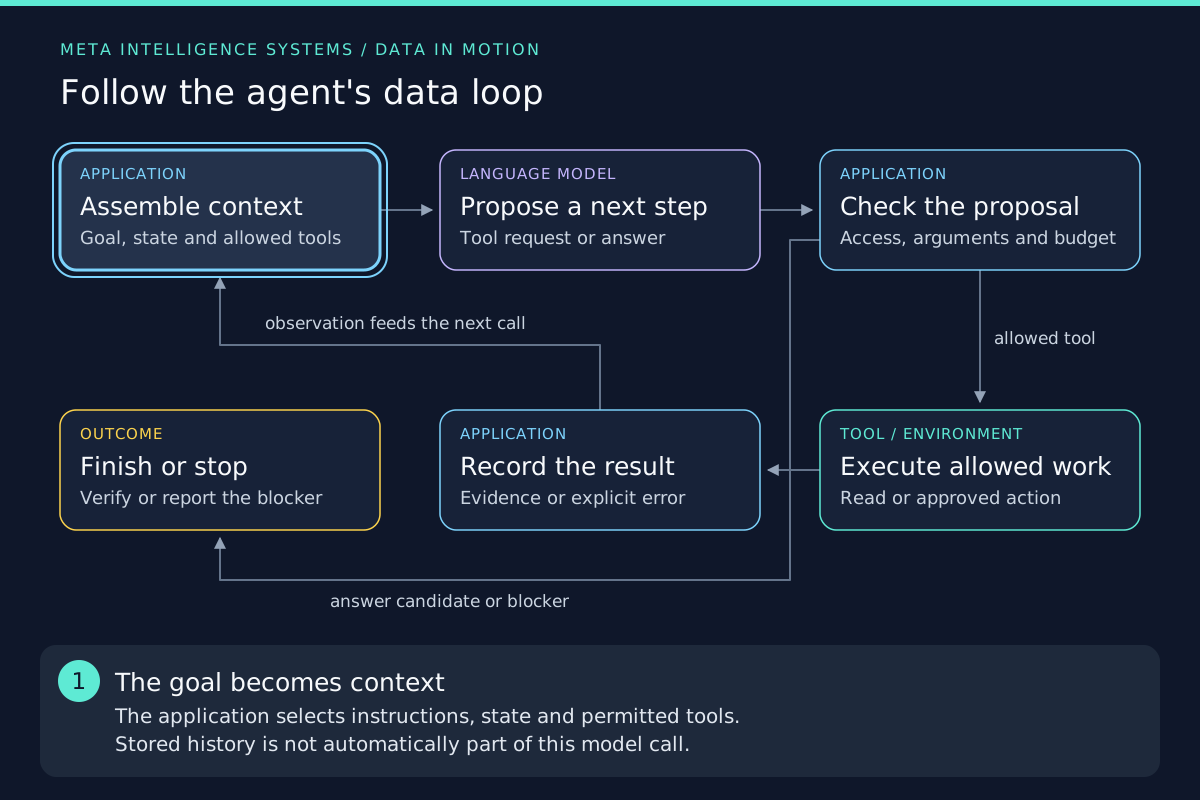
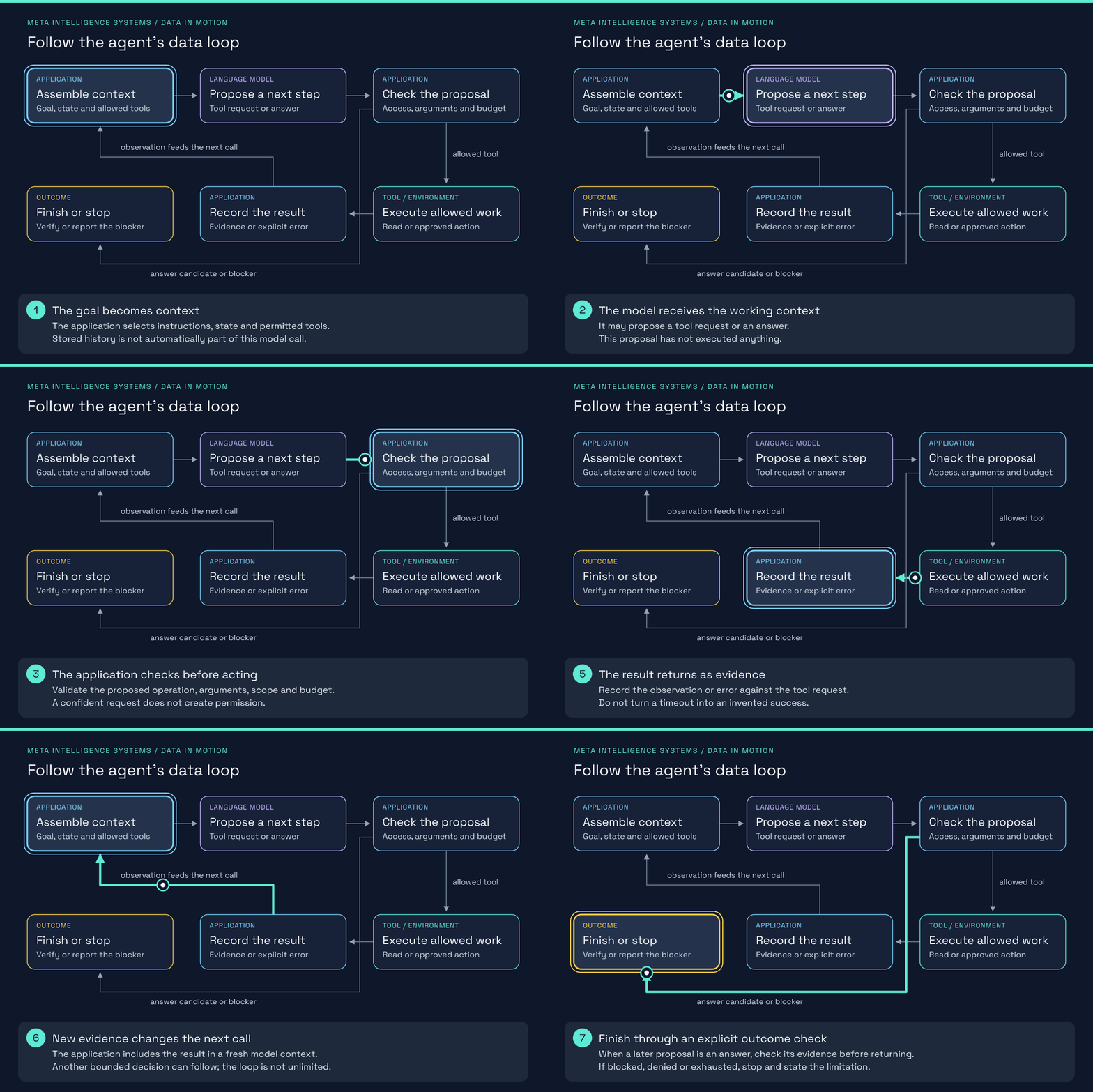
- The goal becomes context. The application selects instructions, state and permitted tools. Stored history is not automatically part of this model call.
- The model receives the working context. It may propose a tool request or an answer. This proposal has not executed anything.
- The application checks before acting. Validate the proposed operation, arguments, scope and budget. A confident request does not create permission.
- Only allowed work reaches the tool. The tool runs under the application's controlled authority. Consequential writes can require a human approval first.
- The result returns as evidence. Record the observation or error against the tool request. Do not turn a timeout into an invented success.
- New evidence changes the next call. The application includes the result in a fresh model context. Another bounded decision can follow; the loop is not unlimited.
- Finish through an explicit outcome check. When a later proposal is an answer, check its evidence before returning. If blocked, denied or exhausted, stop and state the limitation.
Chat response, workflow or agent?
Anthropic distinguishes predefined workflows from systems in which the model selects subsequent steps. A chat interface alone tells you nothing about which architecture is underneath it.
| Design | Who chooses the next step? | Example | Trade-off |
|---|---|---|---|
| Single model call | Application code ends after the response | Summarise supplied text | Simple to inspect, but cannot investigate missing evidence by itself |
| Fixed workflow | Code determines the sequence and branches | Retrieve a policy, draft an answer, validate its format | Predictable routing, but each new task shape needs an explicit path |
| Model-directed agent | The model proposes the next action within application constraints | Search a policy, inspect a cross-reference, then answer or ask for clarification | Adapts to observations, but can choose poorly, repeat itself and consume an uncertain budget |
Retrieval-augmented generation (RAG) supplies external evidence to a model. It can be a fixed retrieval step or a tool an agent chooses to call. Multiple models, persistent memory and the Model Context Protocol (MCP) are possible additions, not conditions that every agent must satisfy.
Walk through a request
Illustrative task: a colleague asks, “Find the current emergency-leave procedure and draft an answer with its source. Do not send anything.” The policy text, identifiers and tool names below are teaching fixtures, not a real employer’s policy or a provider’s API payload.
| Step | Observable event | What the application must retain or check |
|---|---|---|
| Goal | Draft an answer; sending is outside scope | The original constraint, authenticated reader and permitted document collection |
| Context | Supply the task, search/read tool descriptions and relevant conversation | Exclude credentials; make the read-only boundary explicit |
| Model proposal | search_policy(query="emergency leave") |
A request, not a search that has already happened |
| Pre-execution checks | Check the tool name, argument structure, access and remaining budget | Select document scope using trusted identity, not an organisation identifier supplied by the model |
| Tool result | Search returns handbook/leave/emergency, its revision and a matching passage |
Record which request produced it; retain the source and revision rather than only a summary |
| Next proposal | Read the referenced procedure because the search excerpt lacks the approval step | This step follows from an observation, rather than from a fixed upfront plan |
| New result | The fixture procedure says to contact the line manager before submitting a request | The answer must not invent an automatic entitlement |
| Completion check | Draft the procedure with its source and identify any ambiguity | Check that the cited passage supports the answer; confirm no sending tool ran |
If the search finds nothing, there is no obligation to produce an answer anyway. A bounded retry with a better query may be appropriate; otherwise the correct result is a request for clarification or a report that evidence was not found. A fluent substitute would hide the actual failure.
The important state change is not “the model thought harder”. The application now has an observed document revision, a tool result linked to its request and a narrower unresolved question. Those records can be inspected. A model’s private reasoning is neither required telemetry nor a reliable substitute for those observations.
What belongs outside the model
The following are recommended application controls, not defaults supplied by every agent framework.
| Control | Enforced by | What it costs or limits |
|---|---|---|
| Allowed operations and data access | Tool service and host identity checks | Less freedom; separate tools may be needed for distinct permission scopes |
| Argument and result validation | Application schemas and domain checks | More integration work; valid structure still does not establish truth |
| Step, time and spend limits | A shared run budget, including retries and delegated work | Some difficult tasks end incomplete rather than running indefinitely |
| Approval before consequential writes | Authenticated approval flow bound to the exact proposed action | Review latency and reviewer attention; changed actions need a new decision |
| Completion criteria | Outcome checks, evidence checks and human judgement where needed | More work than accepting the model’s final sentence |
For the read-only example, a missing sending capability is a stronger restriction than an instruction not to send. If sending is added later, keep proposal and execution separate. A reviewer should see the recipient, exact content and effect being approved. See human-in-the-loop control for interruption and replay.
Where memory, MCP and other agents fit
Memory supplies context; it does not grant authority. Working state tracks the current run. Saved checkpoints can support recovery. A longer-lived store can supply information from earlier interactions. Deciding what to keep, what to retrieve and whether it is still valid is a separate memory design problem.
MCP connects the application to tools and context. The host operates MCP clients that communicate with servers. The protocol does not decide the agent’s goal, judge an answer or supply the entire control loop. A direct function call can occupy the same place in this diagram. The MCP explainer covers the protocol boundary.
Additional agents divide work, not responsibility. A research worker may return a bounded finding to a coordinator. That adds another context and another execution budget to account for. It does not remove the need to check the combined answer or control shared writes. Start with the orchestration trade-offs, not a team of agents chosen simply because the problem sounds complicated.
Failure modes and the evidence to inspect
| Symptom | Possible failure | Diagnostic |
|---|---|---|
| Repeated searches with no new evidence | Loop has no meaningful progress test | Compare successive queries, returned document IDs and budget consumption |
| Answer cites a real but irrelevant passage | Generation is unsupported even though retrieval ran | Compare each actionable claim with the cited passage |
| Agent says an action succeeded after a timeout | Unknown external outcome presented as success | Read the target system using the operation identifier before considering a retry |
| Retrieved text changes the agent’s instructions | Untrusted content is influencing control decisions | Inspect the source, permitted tools and actual permission checks; see prompt injection |
| Correct action proposed for the wrong reader | Authorisation scope came from untrusted arguments | Inspect the authenticated principal and server-side document filtering |
For a step-by-step investigation, continue to diagnosing a failed agent run. A successful tool response is only one piece of evidence, not a task grade.
When not to use an agent
Use ordinary code for a deterministic transformation with known inputs and rules. Use a fixed workflow when the required sequence is known and exceptions can be made explicit. Use RAG without autonomous tool selection when the problem is finding and explaining a document, not deciding how to investigate it.
An agent is a reasonable candidate when useful next steps depend on information discovered during execution and the task can tolerate bounded uncertainty. The price is variable latency, repeated model and tool calls, and more failure paths to evaluate. Give it an observable success condition before giving it broader authority.
What recent engineering work adds
Anthropic’s April 2026 Managed Agents account separates session history, the harness and the execution sandbox. The useful architectural lesson is that the place where a tool runs need not be the only place where progress is stored. The harness can construct a model context from durable events rather than treating a running process as the agent’s entire memory. This is one vendor’s design, not a requirement or a guarantee that external writes can be replayed safely.
The September additions to this reading path examine retrievable session evidence and adaptive model orchestration. They refine where evidence comes from and how work is allocated; neither replaces the controlled feedback loop shown above.
Try the mechanism without a paid model call
The LangGraph document-assistant course provides a local exercise in state, retrieval, delegation, approval and deduplicated local writes. Its default decision policy is deliberately deterministic: it makes the runtime behaviour inspectable but is not evidence of a live language model choosing these actions. The course separates that lab from its optional provider-compatibility exercise.